

Most "best figure tool" lists compare monthly sticker prices. That is the wrong number for a lab. What actually determines your annual spend is how many people need a login, how many finished figures you produce, how many times each figure gets revised after peer review, and whether your institution will let you charge the subscription to a grant at all. As of September 2026, a BioRender Academic Lab plan runs $1,188/year for five seats, an Adobe Illustrator single-app plan is $263.88/year prepaid, Inkscape is $0, and AI-native tools like FigPad start at $9/month billed annually. Those numbers only become comparable once you divide by finished, journal-ready, still-editable figures. This framework walks through the five questions that decide which column you belong in.
Before anything else: check whether you already have a license
The single largest budget lever in this entire article costs nothing to pull. A large number of universities, medical schools, and research institutes hold institutional site licenses that cover figure software for everyone with an active affiliation. BioRender explicitly routes labs with 15 or more users toward an Institutional Subscription, and many campuses have already bought one — often quietly, through the library or the research office rather than through a department announcement.
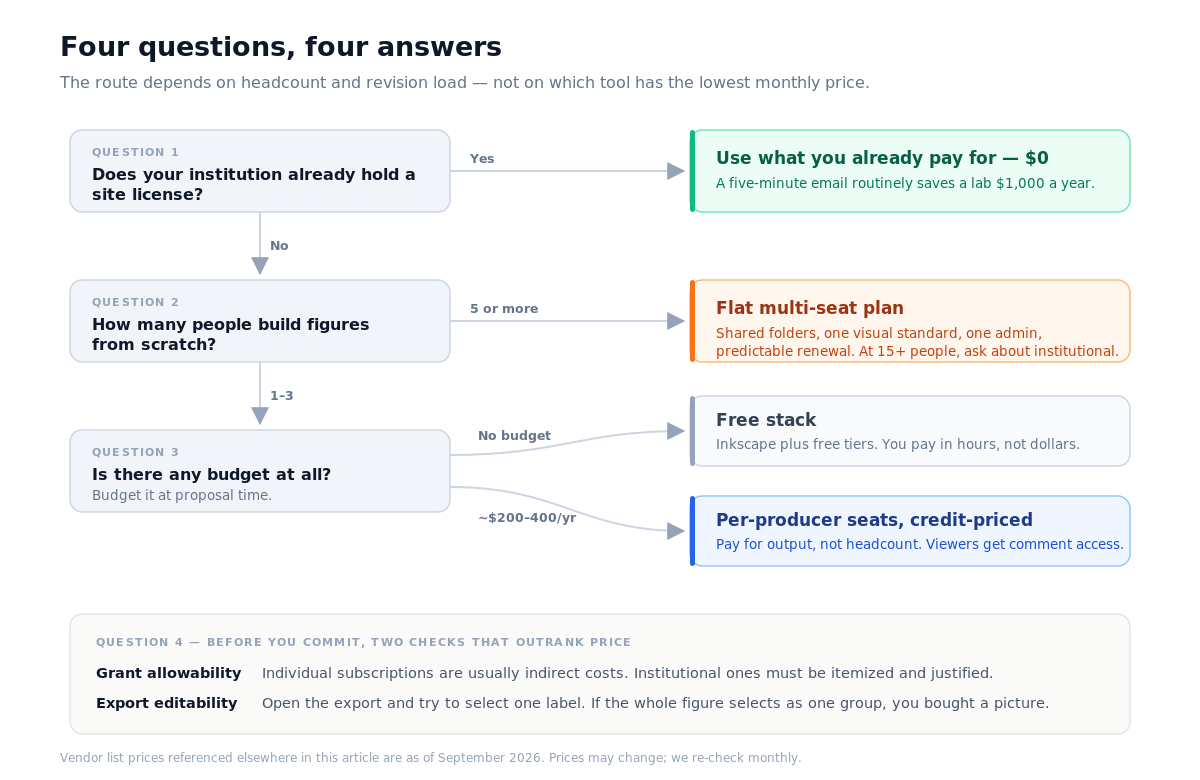
Before you spend a cent, search your institution's software catalog, your library's database page, and your core facility's resource list. Ask your department administrator directly: "Do we have a site license for figure or illustration software?" A five-minute email regularly saves a lab $1,000 a year. The same applies to Adobe: many campuses have negotiated Creative Cloud agreements that make Illustrator free at the point of use for staff and students.
Question 1: How many people need access, versus how many actually make figures?
This is the question that separates seat-priced tools from consumption-priced ones, and labs consistently get it wrong.
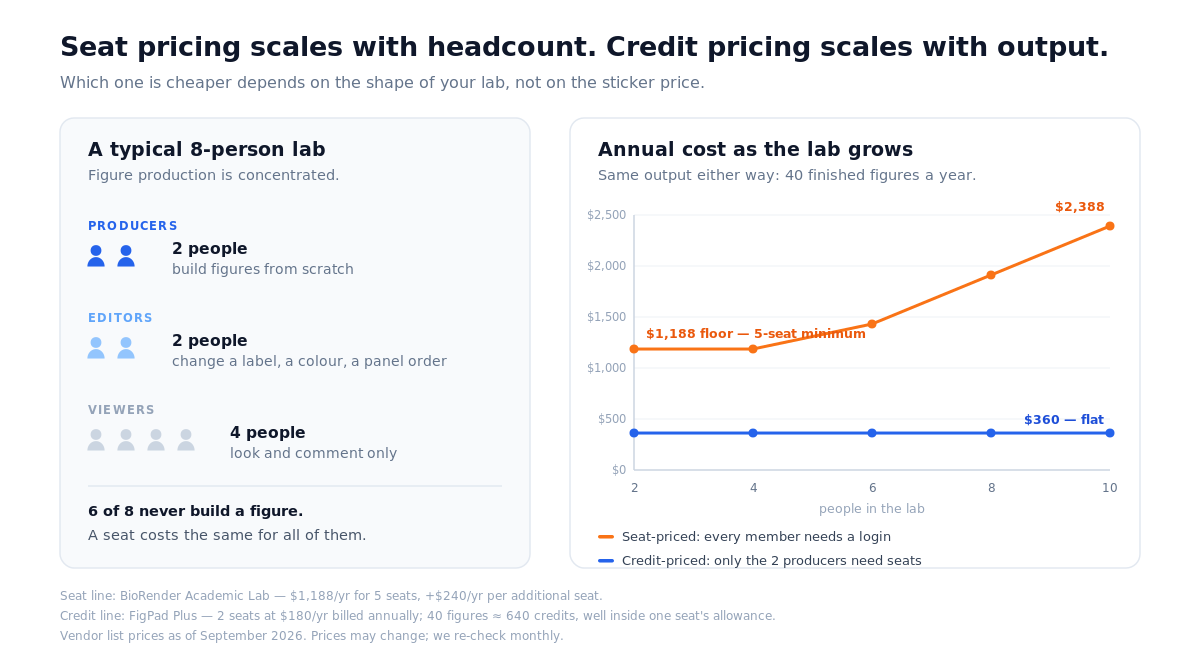
In most groups, figure production is concentrated. Two or three people — usually whoever is closest to submission — make eighty percent of the figures. Everyone else needs to look at a figure, comment on it, and occasionally nudge a label. But seat-based pricing charges the same for a person who makes forty figures a year and a person who makes two.
Count honestly:
- Producers: people who will build figures from scratch this year.
- Editors: people who will change a label, a color, or a panel order on someone else's figure.
- Viewers: people who only need to see and comment.
If your producer count is low and your viewer count is high, seat-priced tools are expensive for you, because you are buying full licenses for people who will log in twice. If your entire lab of six builds figures constantly, a flat multi-seat plan is the cheaper shape.
Question 2: What does one finished figure cost?
A finished figure is not a first draft. It is a draft that survived a co-author round, a formatting pass, and at least one reviewer comment. Price the whole arc.
For seat-priced tools, the arithmetic is simple division. A five-seat BioRender Academic Lab plan at $1,188/year, in a lab that produces 40 publication figures a year, works out to about $29.70 per figure — and revisions are free, because you are paying for time, not actions.
For credit-priced tools, you have to know the per-action cost. FigPad publishes its rates: one generation is 2 credits, a text fix is 2 credits, editing elements directly on the canvas is free, and exporting an editable SVG is 4 credits, with re-exports of the same version free. A typical generate-revise-export loop lands around 16 credits. A Plus seat billed annually includes 220 credits per month, so the same 40-figure year — roughly 640 credits — fits inside a single seat with substantial headroom.
That difference is the whole decision. Seat pricing scales with headcount. Credit pricing scales with output. Pick the one that matches the shape of your lab.
Question 3: What happens on revision round two?
Budget conversations almost never include the revision, which is strange, because the revision is where labs lose days.
If your figure exists only as a flattened PNG or JPEG, a reviewer asking you to rename one label means rebuilding the figure. That cost never appears on an invoice, but at a postdoc's fully loaded hourly rate, two rebuild cycles per paper is real money — usually more than the annual subscription you were agonizing over.
So add one binary question to your evaluation: after export, can you still change one element without touching the others? Concretely, open the exported file in Inkscape or Illustrator and try to select a single text label. If the whole figure selects as one welded group, you bought a picture, not a figure. If the label selects on its own, you bought something you can revise in two minutes at midnight before the deadline.
This is also why export format belongs in a budget article. Layered SVG and editable PPTX preserve object structure; flat PNG does not. A cheap tool that produces unrevisable output is not cheap.
Question 4: Can this actually be charged to the grant?
This is the part no listicle covers, and it derails more lab purchases than price does.
Under the U.S. Uniform Guidance (2 CFR §200.454), subscriptions to business, professional, and technical resources are allowable costs. But allowable is not the same as directly chargeable. In practice, most research offices read the guidance this way: institutional subscriptions can be direct-charged when they provide a direct benefit to the project, provided they are itemized in the budget and explained in the justification, while individual memberships and subscriptions are typically treated as indirect costs. The exceptions are narrow — fellowships and training grants carrying an institutional allowance, and situations where paying the individual fee demonstrably saves the sponsor money. Boise State's Office of Sponsored Programs lays this out clearly, and most U.S. research offices publish something similar.
Two practical consequences:
Budget it at proposal time, not at submission panic time. An unbudgeted software line added mid-award is a conversation with your sponsored programs administrator; a line already sitting in the justification is not.
Watch the discount eligibility rules. BioRender states plainly that its Student and Postdoc subscriptions are heavily discounted and intended for people paying out of pocket: "If reimbursement via your department is required, the discount cannot be offered." So the $180/year student rate and the department-reimbursed rate are different products. If your plan was to have the lab reimburse three students at the student rate, that plan does not work. The Academic Individual plan — $420/year annually, $39/month monthly as of September 2026 — is the reimbursable path.
Also check procurement mechanics. Some labs cannot use a personal card and need a purchase order. BioRender accepts POs for annual subscriptions. If your department is PO-only, a tool with no PO path is effectively unavailable to you regardless of price.
The 2026 cost table
Prices verified from vendor pricing pages and help documentation, as of September 2026. Prices may change; we re-check monthly.
| Tool | Entry price | Lab / multi-seat price | Pricing model | Vector export |
|---|---|---|---|---|
| Inkscape | $0 | $0 | Open source | Native SVG |
| FigPad | $9/mo billed annually ($19 month-to-month) | Per seat; credits reset each cycle | Seat + credits | Layered SVG on Plus/Pro; PPTX |
| Adobe Illustrator | $263.88/yr prepaid, single app | Per seat | Seat | Native SVG, EPS, PDF |
| BioRender Student | $19.95/mo, $68/4 months, or $180/yr | n/a — single user, no department reimbursement | Seat | Raster export (72–600 DPI) |
| BioRender Academic Individual | $420/yr, or $39/mo | n/a — single user | Seat | Raster export (72–600 DPI) |
| BioRender Academic Lab | — | $1,188/yr for 5 seats (+$240/yr per extra seat); $129/mo for 5 seats (+$25/mo per seat) | Seat | Raster export (72–600 DPI) |
Two honest notes on this table. First, "entry price" and "usable price" differ for almost every tool here — free tiers commonly restrict resolution, watermark output, or withhold publication rights, and on FigPad specifically, layered SVG export starts at the Plus tier rather than Starter. Read the tier footnotes before you budget. Second, Inkscape's $0 is real, and its cost is entirely in hours; that is a genuine trade, not a trick.
Three budget scenarios
The $0 thesis chapter. One student, no budget, eight figures, three months. Inkscape plus a free tier for drafting is sufficient, and the time cost is absorbed by a schedule that has slack in it. Do not buy anything.
The two-producer lab, ~40 figures a year. One or two paid seats on a consumption-priced tool beats a five-seat plan, because you are paying for output rather than headcount. Budget roughly $200–400/year, put it in the justification as software, and give the non-producers view-and-comment access rather than seats.
The six-person lab that standardizes everything. A flat multi-seat plan wins here — shared folders, one visual language, one admin, predictable renewal. BioRender's Academic Lab plan at $1,188/year is built precisely for this shape, and if you are already at 15 people, ask about the Institutional tier instead.
How FigPad fits
FigPad sits in the second scenario. It is built around the assumption that the expensive part of a figure is not the first draft but every version after it. You start from a prompt, a sketch, or a reference image, refine the result on a canvas where element edits cost nothing, and export layered SVG — text that is still text, arrows that are still arrows — or PPTX where the figure lands in your slides as editable objects rather than a pasted screenshot. PNG export runs 2K on Starter, 4K on Plus, and 8K on Pro.
For budget planning, three things matter. Publication rights are included on every paid tier, with no separate "publishing" upgrade and no per-figure fee — FigPad's Terms state that you own the outputs generated for you. Credits do not carry a large per-export penalty, so revising is not a cost decision. And if your spend is spiky — nothing for four months, then a submission crunch — non-expiring Pay-as-you-go packs ($12 / 95 credits, $19 / 160, $39 / 340) avoid paying for idle months entirely.
If you are comparing against a specific incumbent, the BioRender alternative breakdown goes through the method difference in detail, and the AI scientific figure generator page shows what the generate-and-refine loop actually looks like on a real figure.
One caveat we would rather state than have you discover: some journals ask authors to disclose AI-assisted figure creation. Check your target journal's policy, and never present a generated figure as primary experimental data.
When you should stay with BioRender
There are labs for which switching would be a downgrade, and it is worth naming them.
You depend on the vetted icon library. BioRender's 50,000+ scientifically reviewed icons are its real strength, and no AI generator replaces a curated, community-recognized visual vocabulary. If your subfield has converged on those conventions, your reviewers expect them.
Your lab standardizes on one visual language across many people. Shared folders, consistent icon usage, and centralized admin across five or fifteen people is exactly what the Lab and Institutional plans are engineered for.
Your institution already pays for it. A site license you already have beats a cheaper tool you have to expense. This is not close.
You need PO-based procurement and predictable renewal. Established vendors with mature purchasing paths reduce administrative friction, which has a real, if invisible, cost.
You need deterministic placement, not generation. If your figures are precise schematics where every element position is decided in advance, manual assembly is the right method and AI generation adds a step.
Key Takeaways
- Check for an existing institutional license first. It is free to ask and routinely saves a lab four figures a year.
- Count producers, not headcount. Seat pricing scales with people; credit pricing scales with output. Match the model to your lab's actual shape.
- Price the revision, not the first draft. A tool whose export cannot be edited element by element costs you rebuild hours that dwarf the subscription.
- Confirm grant allowability before you commit. Individual subscriptions are usually indirect costs; institutional ones need to be itemized and justified. Student and postdoc discounts often exclude department reimbursement outright.
- Budget annually, buy on the cycle that matches your spikes. Annual billing is cheaper if usage is steady; non-expiring credit packs are cheaper if your year has two submission crunches and ten quiet months.
