
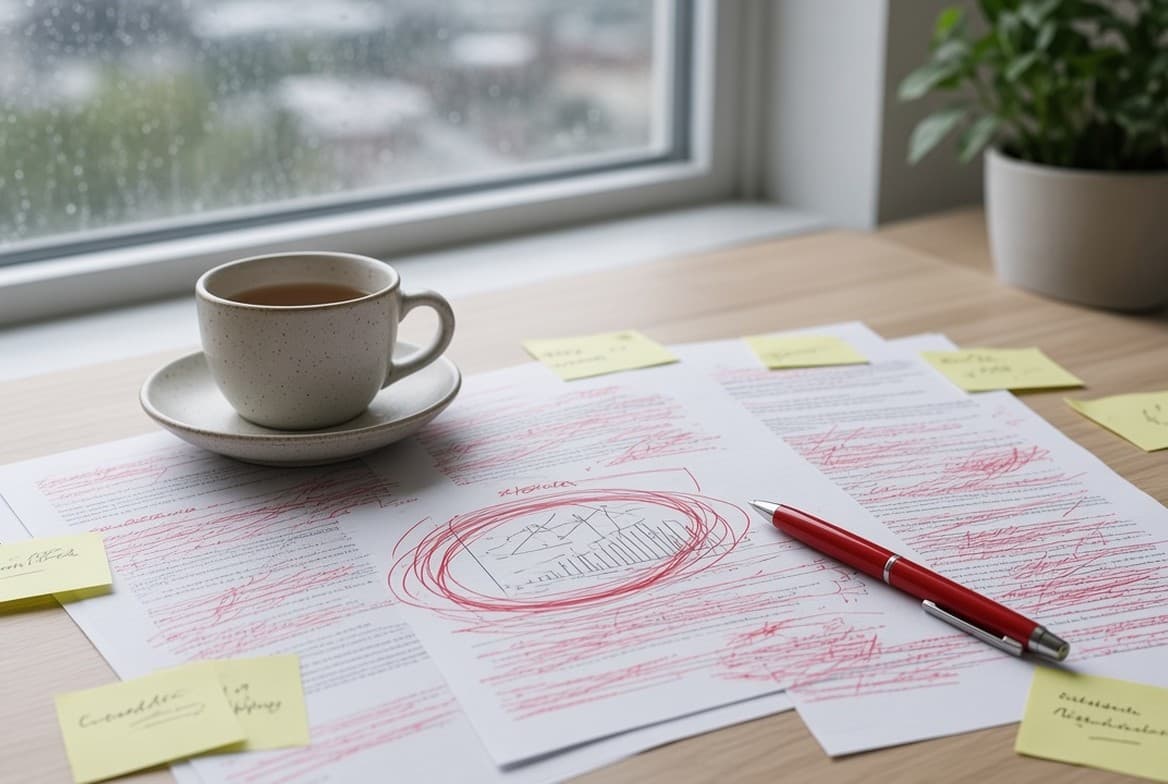
Reviewer 2 asks you to relabel one axis, move an inset, and make Panel C match Panel A. Three sentences of comments, and you lose a weekend. The reason is almost never the science — it is that the only file you still have is a flattened PNG, and a flattened PNG has no label to edit, only pixels that happen to look like one. Journals are explicit about this: Nature asks authors not to rasterize line art or text and to supply editable, unflattened vector artwork wherever possible, and PLOS tells authors that a low-resolution figure cannot be rescued in software — you re-create it from the beginning. This guide lays out a revision workflow built around one rule: keep a structured source file, so the second round of comments costs the same as the first.
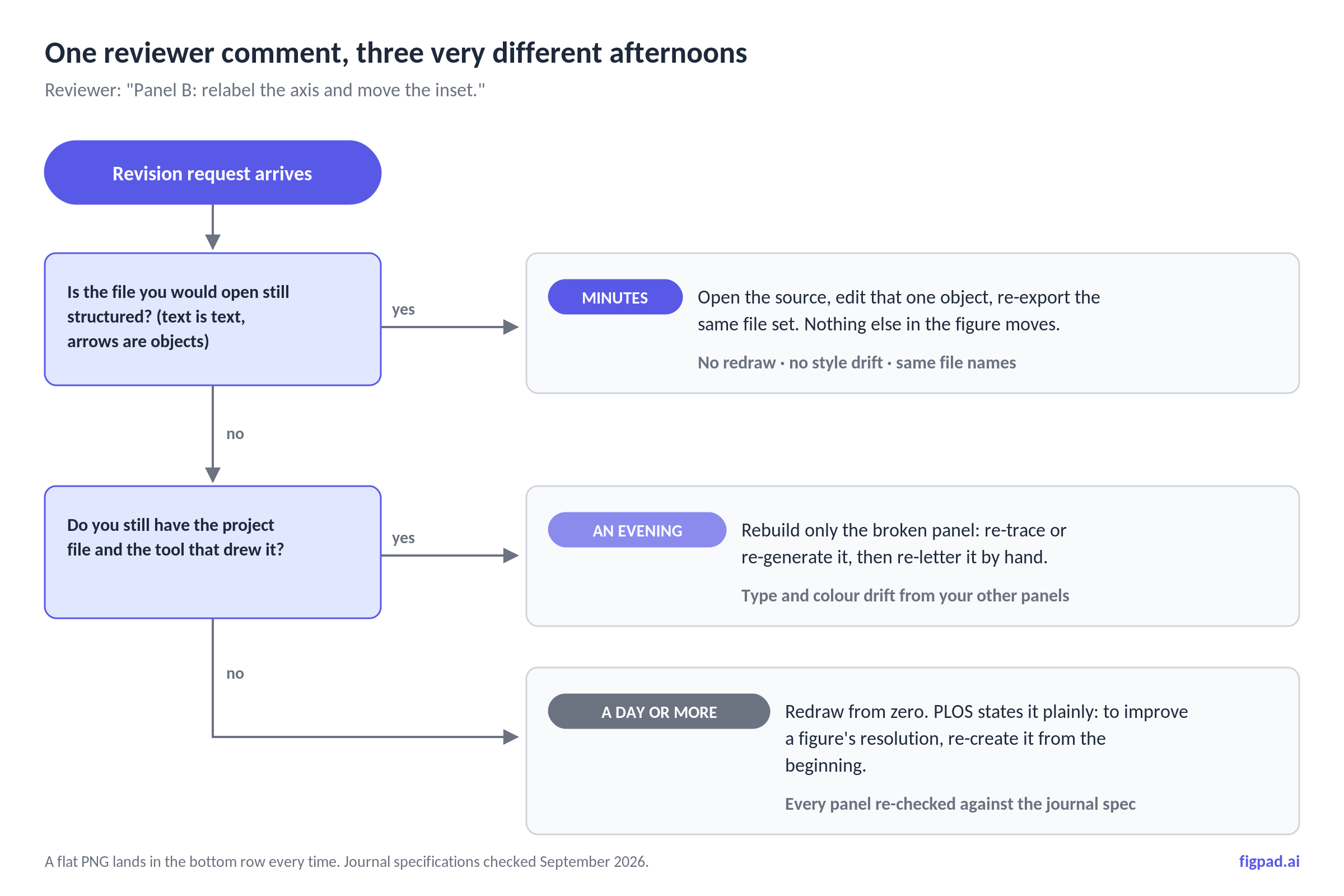
Why the second round of figure comments hurts more than the first
The first version of a figure is made while you are still thinking about the figure. You have the tool open, the layers named, the colours in your head. Revision requests arrive four months later, usually while you are running something else, and the context is gone.
What is left is whatever you saved. If you saved a flat export, every edit is a reconstruction: you re-type the label in a new tool, guess the original font size, guess the grey, and then notice that the new label does not match the four other labels in the same figure. Nobody reviews that drift, so it ships. Across five figures and two revision rounds, a paper slowly acquires three different fonts.
There is a second, quieter cost. Because rebuilding is expensive, authors argue with reviewers about figure changes they would have simply made if the change took four minutes. That is a bad reason to push back on a reviewer.
Step 1: Decide now which file is your source of truth
Before submission, pick one file per figure that you would open if someone asked for a change, and make sure it is structured — text stored as text, arrows as objects, panels as separate groups. Acceptable answers: a layered SVG, an Illustrator or Inkscape project, an editable PPTX, a layered PSD, or a script that regenerates the plot.
Unacceptable answers, no matter how good they look: a PNG, a JPEG, a flattened TIFF, or an SVG produced by auto-tracing a bitmap. That last one catches people out. Auto-trace gives you a file with an .svg extension and none of the editability — the label is a welded clump of spline outlines, so you can recolour it but you cannot retype it.
Store the source next to the submitted export, in the same folder, with a name that ties them together. fig02_pathway_SOURCE.svg beside Fig2.tif is enough. The point is that six months from now, Future You should not have to guess.
Step 2: Read the revision letter as a list of objects, not a list of figures
"Fix Figure 2" is not a task. Break each comment into the smallest object it touches, and write the list before opening any tool:
- Panel B y-axis label: "Concentration (mM)" → "Concentration (µM)"
- Panel B inset: move from top-right to bottom-left
- Panel C arrow colour: match Panel A (same blue)
- Legend: define the dashed line
Now you know whether this is a text-only revision (cheap in any structured format), a layout revision (needs real objects to move), or a data revision (needs the plotting script, not the figure tool). Most reviewer figure comments are text-only, which is exactly the class of edit that a flattened export makes impossible and a structured file makes trivial.
Step 3: Edit the source, never the export
Make every change in the source file, then re-export. Editing the exported TIFF directly is how figures acquire mismatched fonts, and in blot or gel figures it is how authors drift into territory that journals treat as image manipulation — PLOS requires original uncropped images for all blot and gel results and asks that any adjustment be applied consistently to the whole image.
While you are in the source, respect the constraints that will be checked later, because fixing them now is free:
- Fonts. Elsevier accepts only Arial (or Helvetica), Courier, Symbol, and Times (or Times New Roman), and warns that non-standard fonts may be substituted, producing missing symbols or overlapping type. PLOS is narrower still: Arial, Times, or Symbol, 8–12 pt.
- Type size and line weight. Nature sets panel labels in 8 pt bold, caps other text at 7 pt with a 5 pt floor, and asks for line weights between 0.25 and 1 pt at final size — anything thinner can vanish in print.
- Width. Nature's standard figure widths are 89 mm (single column), 120–136 mm (column and a half), and 183 mm (double column), with a full page depth of 247 mm. PLOS wants 789–2250 pixels wide at 300 dpi and no taller than 2625 pixels.
Step 4: Re-export the whole set, not just the panel you changed
Export every figure in the paper again from its source, even the ones nobody commented on. It costs almost nothing if your tool prices exports sanely, and it guarantees that all figures came out of the same pipeline with the same colour mode and the same fonts.
Then re-check the format rules, which differ by publisher and are easy to get wrong at 1 a.m.:
- PLOS: TIFF or EPS only, 300–600 dpi, under 10 MB, RGB 8-bit or grayscale, and TIFFs must be flattened with no layers (a single layer called "Layer 1" still counts as layered). Files are named
Fig1.tif,Fig2.eps. PLOS waives formatting requirements until a provisional Editorial Accept, and offers a free automated checker, NAAS, that assesses figures against those specs. - Elsevier: EPS preferred for vector art, TIFF for bitmaps, at 300 dpi for halftones, 500 dpi for combination art, and 1000 dpi for line art. Name files so the type and number are visible:
FIG1.TIF. - Nature: layered PSD or TIFF at 300–600 dpi for photographic content, AI/EPS/PDF for line art, RGB recommended (it is converted to CMYK for print), and do not rasterize or outline text.
Note the tension that trips people up: PLOS wants the submitted TIFF flattened, while Nature wants layers preserved. Both are satisfied by keeping your own layered source and exporting to whatever the journal asks. Neither is satisfied by only having the export.
Step 5: Make the figure change checkable in your response letter
Editors and reviewers do not diff images. Say what changed, in object terms, in the response-to-reviewers document: "Panel B y-axis relabelled to µM; inset moved to bottom-left; no underlying data changed." PLOS asks for a response addressing each reviewer point, plus a tracked-changes copy and a clean copy of the manuscript.
One operational detail worth knowing: at PLOS, figures from your original submission carry over automatically to the revised submission unless you replace them. If you edited a figure but forgot to upload it, the old version stays. Re-upload every figure you touched, and check the file list before you hit submit.
What one reviewer comment costs, by source format
Times below are for a single label-and-layout change on one multi-panel figure, assuming the file named in column one is all you have. Assessed as of September 2026 against the journal specifications cited above; journal rules and tool pricing both change, so we re-check monthly.
| What you kept | Retype one label | Move a panel or inset | Meets TIFF/EPS-only rules? | Realistic time |
|---|---|---|---|---|
| Flat PNG / JPEG | No — pixels only | No | Convertible, but quality is capped | Hours to a day (redraw) |
| Flattened TIFF | No | No | Yes | Hours to a day (redraw) |
| Auto-traced SVG | No — text is outlines | Partly, as spline clumps | Yes, via EPS | Hours |
| Layered SVG | Yes | Yes | Yes, via EPS or TIFF | Minutes |
| Editable PPTX | Yes | Yes | Export needed | Minutes |
| Illustrator / Inkscape project | Yes | Yes | Yes, native EPS | Minutes, if you know the tool |
| Layered PSD | Yes, if text is live | Yes | Yes (flatten on export) | Minutes |
| Plotting script (R, Python, MATLAB) | Yes | Yes | Yes | Minutes, and reproducible |
The pattern is not "vector good, raster bad." It is whether the thing the reviewer named still exists as a separate object in the file you kept.
How FigPad fits
FigPad is built around this exact failure mode: generation is the easy part, and the revision is where tools lose you. You describe a figure, sketch it, or drop in a reference image, and the AI scientific figure generator produces a structured draft rather than a flat picture. Export is layered SVG — text stays text, arrows stay arrows, shapes stay separate objects — so it opens editable in FigPad's canvas, Illustrator, or Inkscape. There is also PPTX, where the figure lands in your slides as editable objects for the lab meeting version, and PNG or JPG at the resolution the model generates.
Layered SVG export is available on every plan, including free. Plans start at $12/month billed yearly; Plus is $20/month billed yearly or $29 month-to-month, Pro is $29/month billed yearly or $49 month-to-month, and one-time credit packs start at $12 for 95 credits that never expire (prices checked 2026-11-02). See the pricing page for current figures.
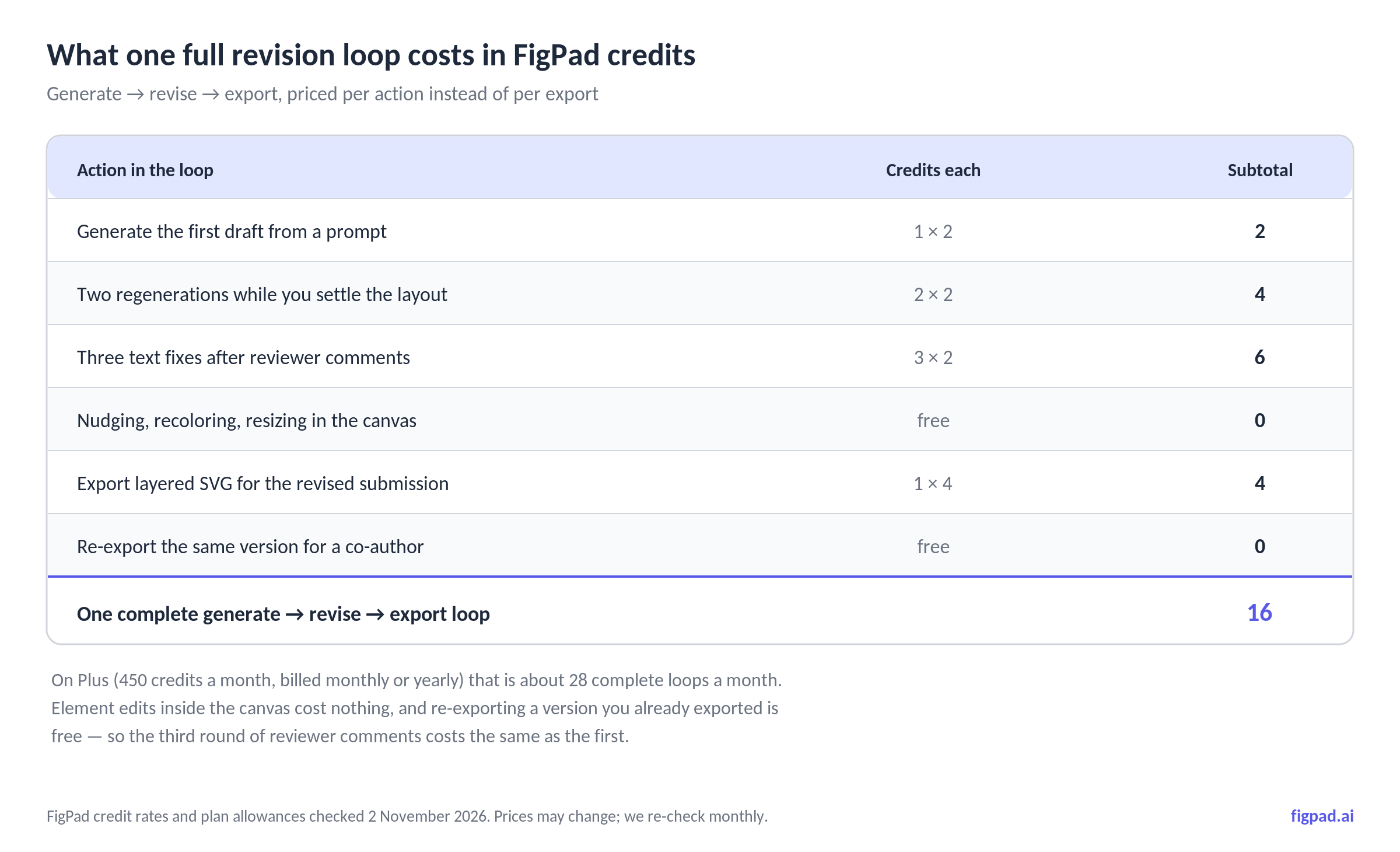
The credit model is what matters for revisions. One generation costs 2 credits, a text fix costs 2, editing elements in the canvas is free, and exporting an editable SVG costs 4 credits — re-exporting the same version is free. There is no large per-export fee, so a full generate → revise → export loop runs about 16 credits.
Figures on free and paid plans come with publication rights and a free, verifiable Publication Authorization Certificate, with no separate publishing tier and no per-figure fees, and FigPad's Terms state that your content is not used to train its own models. If your revision is a graphical abstract rather than a main figure, the graphical abstract generator follows the same editable-source rule, and the scientific figure creator covers general paper figures.
One honest caveat, and it is in FigPad's own FAQ: some journals ask authors to disclose AI-assisted figure creation. Check your target journal's policy, and never present a generated image as primary experimental data.
When you should stay with the tool you already have
If your figures are plots of your own data, your source of truth should be the script, not a figure tool. A ggplot2 or matplotlib script regenerates the entire figure from the data when a reviewer asks for a different bin width — no drawing tool can match that, and it makes your figure reproducible alongside your analysis.
If you are deep in Adobe Illustrator and your lab has a shared style file, stay there. Illustrator's typographic control, precise alignment, and native EPS output are better than anything a browser canvas gives you, and the revision cost is already low because you kept the .ai project.
If your work depends on a vetted, standardised icon set — consistent cell types, receptors, organisms, drawn to a single visual grammar across a whole lab — BioRender's library is genuinely strong, and swapping it out for the sake of a cheaper revision loop is a bad trade. The case for changing tools is about cost per finished figure and about what your export file is made of, not about icon quality.
And if a figure is one panel that you draw once and never touch, the whole argument is moot. Use whatever is fastest.
Key Takeaways
- The revision cost is decided before you submit, by whether you kept a structured source file — not by how good the figure looks.
- An
.svgfrom auto-tracing is not editable. If the text is outlines, you cannot retype the label a reviewer asked about. - Break reviewer comments into objects (this label, this arrow, this panel) before opening any tool; most figure comments are text-only.
- Export rules conflict on purpose — PLOS wants flattened TIFF or EPS, Nature wants unflattened layers — and only a layered source satisfies both.
- Re-upload every figure you changed. At PLOS, unreplaced figures carry over from the original submission automatically.
