

A flat AI image is a picture of a figure, not a figure. Every label in it is pixels, every arrow is pixels, and the moment a reviewer writes "please change AMPK to AMPKα1 in panel B," you have no label to change — only an area to retouch. This is not a stylistic complaint. As of September 2026, Nature's final-submission guide tells authors to "supply editable, unflattened vector artwork" and to "not rasterize or convert text to outlines"; Elsevier requires embedded fonts in every EPS or PDF vector drawing; Cell Press requires Arial at 6–8 pt and stroke widths of 0.5–1.5 pt at print size. None of those instructions can be satisfied by a PNG, because a PNG has no text, no fonts and no strokes. It has pixels that happen to look like them.
The revision is the part that breaks, not the generation
Generating a decent-looking figure stopped being the hard part some time in 2024. Any current image model will give you something plausible in twenty seconds, and for a lab meeting slide that is genuinely enough.
The hard part arrives four months later, in a decision letter. Reviewer 2 wants one gene symbol corrected and one arrow reversed. The editor wants the figure to fit a single column. Production wants the fonts embedded. Each of these is a ten-second edit on a structured file and a rebuild on a flat one.
That asymmetry is the whole argument. A figure's cost is not what it takes to make; it is what it takes to make again, on someone else's schedule, three times. If you are picking a tool on the strength of its first output, you are optimising the cheap half of the job.
And rebuilding is worse than it sounds, because generative models are not deterministic. Re-prompting for "the same figure but with AMPKα1" does not return the same figure with one word changed. It returns a different figure. Now your panel B no longer matches the panel B your co-authors approved, the colour of the mitochondrion has drifted, and you are re-checking the whole thing for accuracy instead of fixing one label.
"Editable" has three levels, and vendors blur them on purpose
The word is doing a lot of unearned work in tool marketing. Pin it down:
Level 1 — pixel-editable
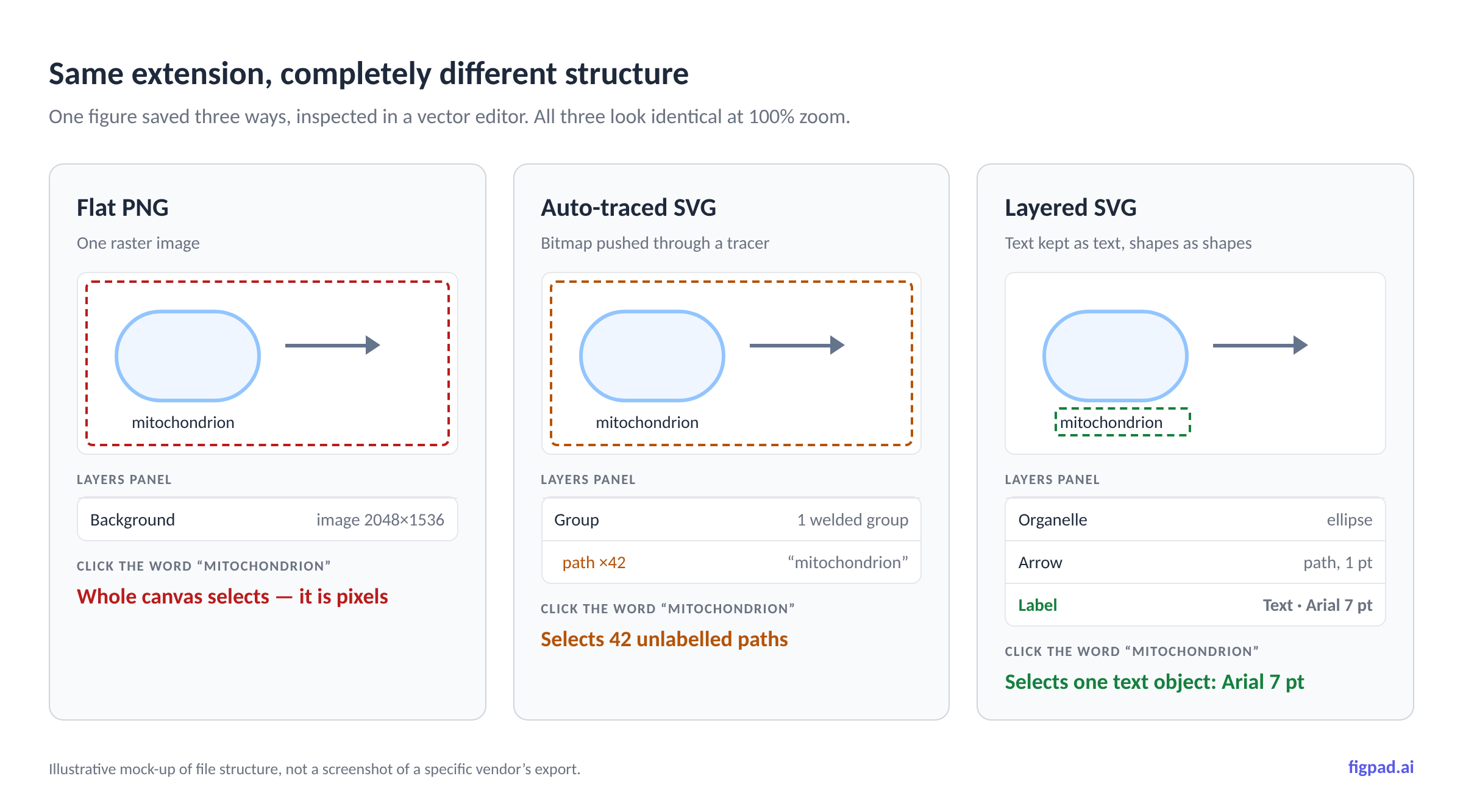
You can open the PNG in Photoshop or GIMP and paint. Changing a label means covering the old text, matching the typeface by eye, and retyping. It works at 100% zoom and falls apart in print. It is also the level at which you start creating problems for yourself with image-integrity screening, because you are retouching a published-figure file by hand.
Level 2 — object-editable
The file is a structured document. Text is live text with a font name attached; arrows are paths with stroke widths; panels are separate objects you can select, move and align. Layered SVG, PPTX, .ai, and a .psd with its layers intact all sit here. Changing a label means double-clicking it and typing. This is the only level that survives a real revision cycle.
Level 3 — source-editable
You still hold the thing the figure was generated from — the prompt, the sketch, the structured description — so you can regenerate variants. Useful for exploration, useless for surgical fixes, because regeneration is not editing.
Two traps hide in the gap between levels 1 and 2. First, vectorization is not automatically level 2. Auto-trace converts a bitmap into a single welded group of splines; you get a file with an .svg extension where the word "mitochondrion" is forty-two unlabelled paths, not a text object. It scales cleanly and it is still unfixable. Second, outlined text is not live text — which is precisely why Nature says not to convert text to outlines. A vector file whose type has been outlined has thrown away the font information that production needs.
What journals actually require, as of September 2026
Journal artwork instructions are unusually concrete on this point, and almost nobody reads them until the accept-in-principle email arrives. Three of the big families, in their own words:
Nature asks authors to "please do not rasterize line art or text in submitted figures and wherever possible supply editable, unflattened vector artwork," and separately: "Do not rasterize or convert text to outlines." Lettering must be sans-serif — Helvetica or Arial — and the same font throughout all figures in the paper, at a maximum of 7 pt and a minimum of 5 pt, with panel labels at 8 pt bold. Line weights must be between 0.25 and 1 pt at final size, and "lines thinner than 0.25 pt may vanish in print." Preferred formats are AI, PostScript, vector EPS or PDF for line art, and layered PSD or TIFF for raster.
Elsevier requires that you "always include/embed fonts and use the recommended fonts where possible: Arial, Helvetica, Courier, Times, Times New Roman, Symbol," with line weights from 0.10 pt to 1.5 pt. Resolution minimums are 300 dpi for greyscale and RGB halftones, 500 dpi for combination art, and 1000 dpi for line art — 1200 dpi if the image contains very fine line weights.
Cell Press wants 300 dpi for colour, 500 dpi for black and white, and 1,000 dpi for line art, all at the desired print size; Arial only, embedded; text at 6–8 pt at print size; stroke widths 0.5–1.5 pt.
Now the honest complication, because it cuts against the obvious reading: Cell Press also tells you to flatten. Its guidance is to "reduce to one layer (flatten Artwork) before saving your image (except for the journal Cell)." That is not a contradiction of everything above — it is the point. The file you submit is a rendering. The file you keep is the master. Editability is a property of your working copy, and its value is that you can produce a fresh, correct rendering on demand, in whatever format and at whatever width the journal asks for. A flat AI image gives you the rendering with no master behind it, which is why the second request is so much more expensive than the first.
The resolution trap nobody checks until production
Resolution requirements are stated in dpi at print size, and a PNG has no print size — only pixels. So the same file is compliant or non-compliant depending on how wide the journal runs it.
Take a nominal long edge of 2048 px ("2K"), 4096 px ("4K") and 8192 px ("8K"), and divide by the actual column widths. Nature runs figures at 89 mm (single column), 120–136 mm (column-and-a-half) or 183 mm (double column); Cell Press two-column journals use 85 mm, 114 mm and 174 mm.
| Export (long edge) | At 89 mm | At 174 mm | At 183 mm | Clears 300 dpi? | Clears 1000 dpi line art? |
|---|---|---|---|---|---|
| 2K (2048 px) | 584 dpi | 299 dpi | 284 dpi | Single column yes; full width borderline to no | No |
| 4K (4096 px) | 1169 dpi | 598 dpi | 569 dpi | Yes | Only at single column |
| 8K (8192 px) | 2338 dpi | 1196 dpi | 1137 dpi | Yes | Yes |
| Vector (SVG/EPS/PDF) | n/a | n/a | n/a | Resolution-independent | Resolution-independent |
Arithmetic as of September 2026, using the column widths published by Nature and Cell Press; check the actual pixel dimensions of your own export rather than trusting the "2K/4K/8K" label. Requirements may change; we re-check monthly.
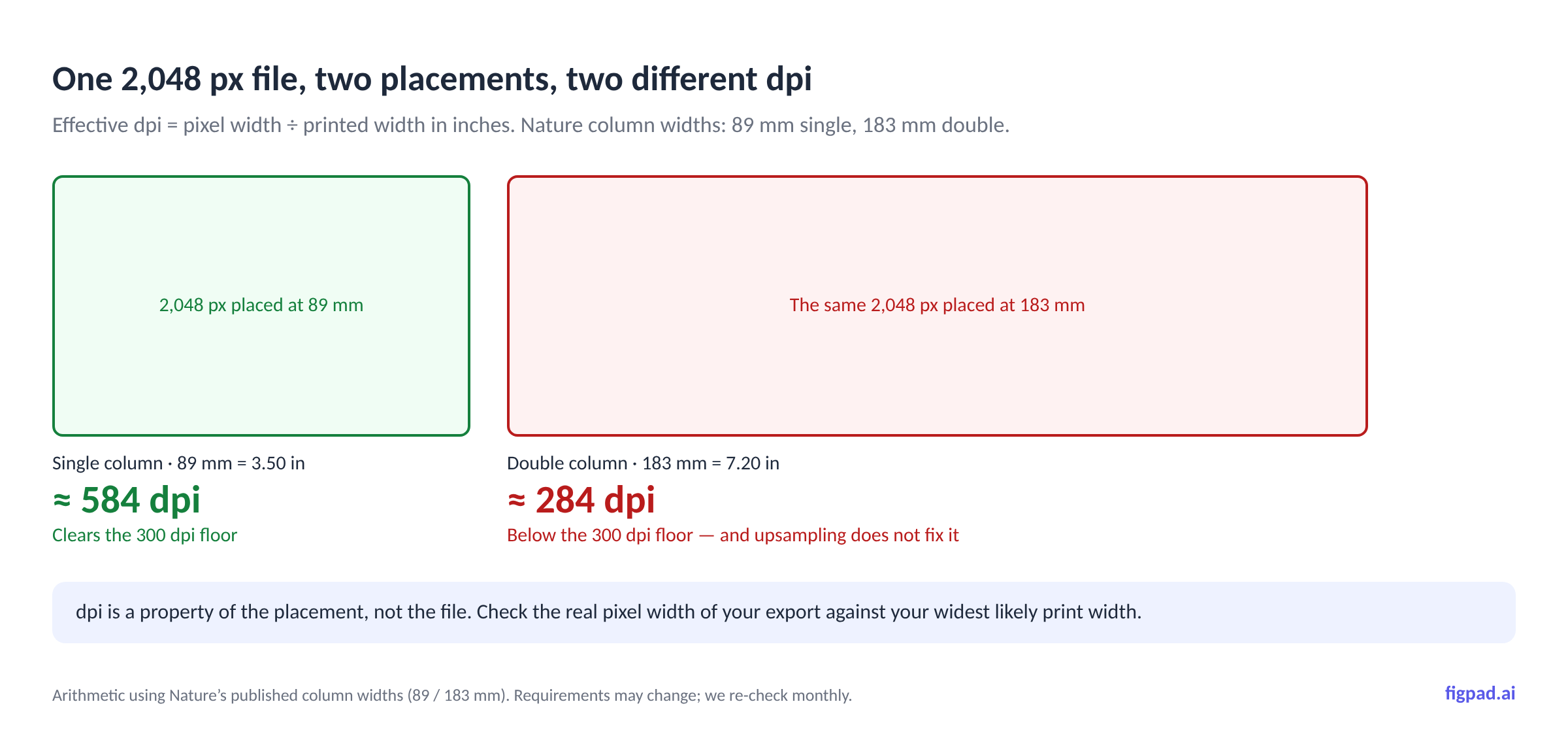
The row that should worry you is the first one. A 2K export is comfortably fine as a single-column figure and lands at 284 dpi across a Nature double-column spread — under the 300 dpi floor, for a file that looked perfect on your monitor. And you cannot fix it after the fact: as Nature puts it, "artificially increasing an image's resolution in an artwork program will not improve its quality." Upscaling adds pixels, not detail.
Vector sidesteps the entire table. That is the actual argument for SVG — not that it is sharper, but that it has no wrong answer.
What editability costs you at each level
| Revision request | Flat PNG | Auto-traced SVG | Layered SVG / PPTX |
|---|---|---|---|
| Change one gene symbol | Retouch by hand or regenerate the whole figure | Retouch by hand — text is paths, not text | Double-click, type |
| Reverse one arrow | Repaint the region | Select and rotate a spline group; arrowhead breaks | Select the arrow, flip it |
| Switch all type to Arial 7 pt | Impossible — there is no type | Impossible — type was outlined | Select all text, set font |
| Resize to single-column width | Text may fall below the 5 pt minimum | Strokes rescale, weights drift out of range | Rescale, then reset stroke weights |
| Embed fonts for production | No fonts exist to embed | No fonts exist to embed | Fonts embed on export |
| Reuse one panel in a talk | Screenshot a screenshot | Paste an unpickable group | Drop the PPTX in; objects stay editable |
Comparison of file structures, not of specific vendors, as of September 2026.
How FigPad fits
FigPad exists because of the second column of that table. The workflow is prompt, sketch or reference image in; a structured, object-editable figure out — and the export formats are chosen so that the revision request is a two-minute job rather than a rebuild.
Concretely, as of November 2026: layered SVG export is available on every plan, including free, and "layered" means text stays text and arrows stay arrows rather than being traced into a welded spline group. PPTX export drops the figure into a slide as editable objects, which matters more than it sounds like it does when a committee member asks you to change one word an hour before your talk. PNG and JPG download at the resolution the model generates, so check the real pixel width of the file against the table above before you rely on a raster at your target journal's widest column — or submit from the vector master.
The credit model is built around the same premise. One generation costs 2 credits, a text fix costs 2, editing elements on the canvas is free, and exporting an editable SVG costs 4 credits with re-exports of the same version free — so a typical generate–revise–export loop lands around 16 credits. There is no per-figure publication fee and no separate "publication" tier: figures on free and paid plans come with publication rights and a free, verifiable Publication Authorization Certificate. Plans start at $12/month billed yearly; Plus is $20/month billed yearly or $29 month-to-month, Pro is $29/month billed yearly or $49 month-to-month, and one-time credit packs start at $12 for 95 credits that never expire (prices checked 2026-11-02). Prices may change; we re-check monthly.
If you want to see where this fits in a submission workflow, the AI Scientific Figure Generator page walks through the generate-then-edit loop, and the Graphical Abstract Generator covers the single-panel case where journals impose fixed pixel dimensions. If you are arriving here with a flat image you already have, start from the Scientific Figure Creator and run it through the vectorizer — with the caveat above that recovery is never as clean as having kept the structure in the first place.
One thing we will not blur: editability is not a permission slip. Some journals ask authors to disclose AI-assisted figure creation, so check your target journal's policy before you submit, and never present a generated image as primary experimental data. Cell Press screens every accepted manuscript for image integrity, and an editable file makes it easier to do the right thing, not optional.
When a flat PNG is genuinely fine
Not every figure needs this, and pretending otherwise would be dishonest.
One-off talk slides and lab meetings. If the image will be seen once, at 1920 px on a projector, structure buys you nothing. Generate it, use it, move on.
Figures already accepted and in press. The revision risk is behind you. Archive the high-resolution raster and stop paying for flexibility you will not use.
Photographs, micrographs and gels. These are raster by nature and should stay raster — Cell Press wants TIFF at 300 dpi for colour, and vectorizing a micrograph would be both pointless and an integrity problem. Structure applies to the annotation layer over them, not the image data.
Social and web use. A graphical abstract repurposed for a lab website or a conference post is a fixed-size raster job.
Journals that want flattened files and nothing else. As noted, most Cell Press titles ask you to flatten before saving. Keep your master editable, submit what they ask for.
Key Takeaways
- A flat AI image is a rendering without a master. You can look at it; you cannot fix it. The first output is cheap and the second one is not.
- "Editable" has three levels. Only object-editable — layered SVG, PPTX,
.ai, layered.psd— survives a reviewer's label change. Auto-traced SVG and outlined text look like level 2 and behave like level 1. - Journals require things pixels cannot provide. Nature asks for unflattened vector artwork and text that has not been outlined; Elsevier and Cell Press require embedded fonts and specific stroke-weight ranges. A PNG has no fonts and no strokes.
- Resolution is dpi at print size, not pixels. A 2K export lands near 284 dpi across a Nature double-column figure, and upscaling afterwards adds pixels rather than detail.
- Flattening on submission is fine; flattening as your only copy is not. Several journals explicitly ask for flattened files. Keep the structured master so you can re-render on demand.
