

An editable PPTX export puts your figure on a slide as native PowerPoint objects — text boxes you can retype, shapes you can recolour, groups you can pull apart — instead of one flat picture you have to regenerate every time a co-author changes a label. That distinction decides how a Thursday-morning lab meeting goes. BioRender's PPTX export is limited to select paid plans and is not supported for posters, and its illustration export offers no vector option at all (BioRender Help, re-checked 2026-11-02). FigureLabs and FigPad both export SVG and PPTX, at very different credit costs. Elsevier accepts PowerPoint files as artwork but prefers EPS, PDF, TIFF or JPEG. This guide covers when PPTX is the right export, when layered SVG is, and when a high-resolution PNG is simply the honest answer.
The real problem: your figure has two audiences, and only one of them is a journal
Most figure advice is written for submission. But the file you show in a lab meeting on Thursday is the same file you will put in a grant figure in March and a defence slide in June — and every one of those stops asks for a different edit. The PI wants "knockout" changed to "conditional knockout." A collaborator wants panel C moved above panel B. Someone wants the arrows in the group's colour scheme instead of the tool's default.
If the figure on that slide is a PNG, every one of those edits goes back to whoever made the figure. If it is a PPTX export where each element is a real PowerPoint object, the person who noticed the problem can fix it in fifteen seconds, in the meeting, without opening anything else.
That is the entire argument for editable PPTX. It is not about image quality — a 4K PNG looks fine on a projector. It is about who is allowed to make a change and how long the loop takes.
What "editable PPTX" actually means (and what it doesn't)
A PPTX file is a zip archive of XML describing slides and the shapes on them. When a figure is exported as editable PPTX, the exporter walks the figure's vector structure and writes each element out as a PowerPoint drawing object: a text run becomes a text box, a filled path becomes an autoshape or freeform, a group becomes a group.
Three things follow that people usually learn the hard way:
Text is editable only if it was text. If the source figure was a raster image, or vector paths where letters were welded into outlines, no exporter can give you back a typeable label. Vectorization can recover shapes, but genuine text objects come from figures that carried real text all along.
Fidelity is a spectrum, not a switch. Complex gradients, clipping masks and blend modes have no clean PowerPoint equivalent. A good exporter approximates or flattens those specific elements while keeping labels and simple shapes live. Check the export once, at the start, rather than at 11pm the night before.
Editable does not mean submission-ready. PPTX is a presentation format that some publishers accept as artwork; it is not what most of them prefer. That is a separate decision, covered below.
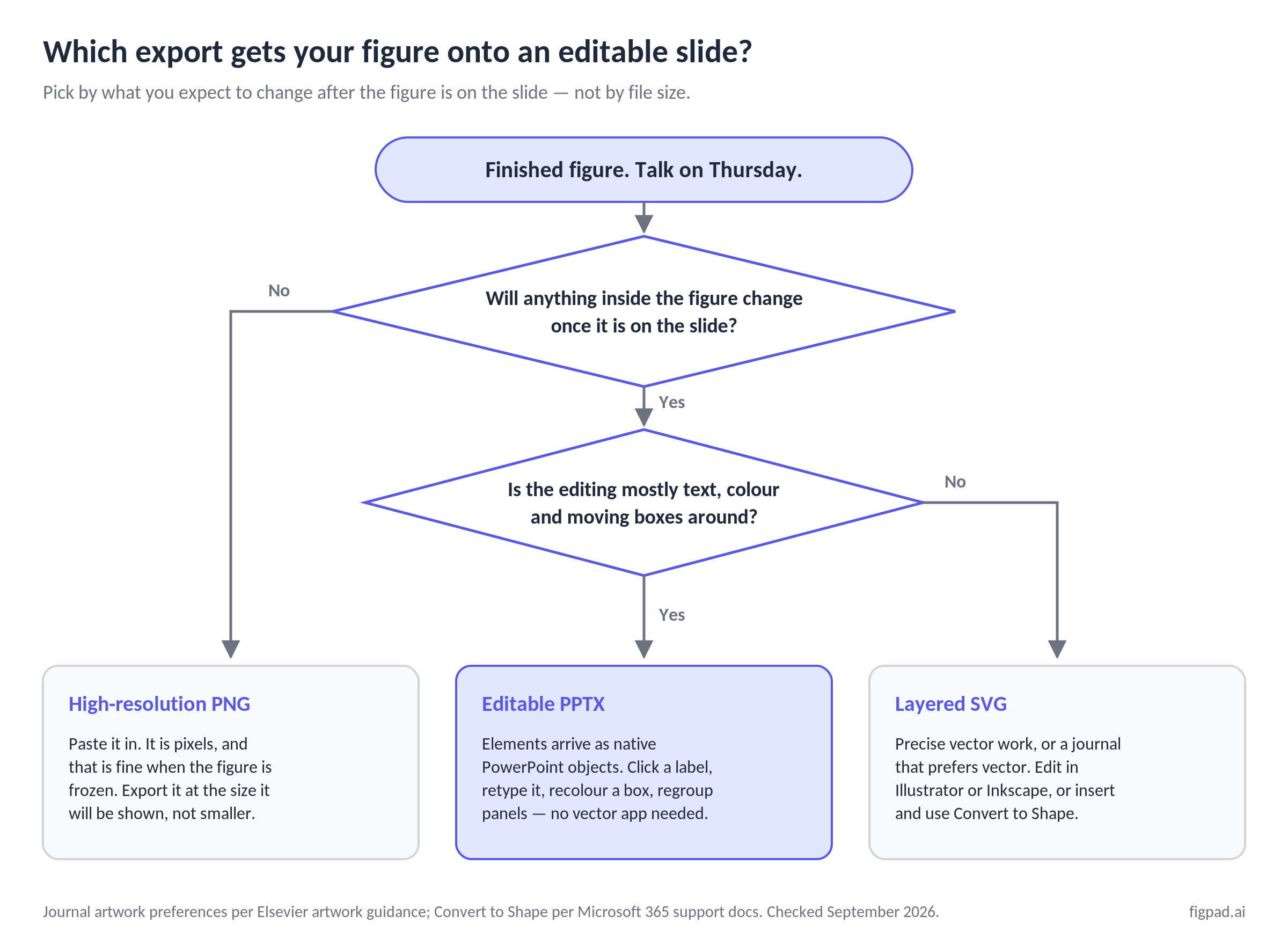
PPTX or SVG? Choose by the edit you expect, not the file size
Both are "editable." They are editable in different rooms.
Choose editable PPTX when the next edit happens in PowerPoint, by you or by someone else, and it is mostly text, colour, or arrangement. Lab meetings, journal club, teaching slides, a talk you are rehearsing on a train. The advantage is social as much as technical: everyone in a biology department can already open and edit a PPTX. Almost nobody will install Inkscape to fix your typo.
Choose layered SVG when the next edit is precision vector work, or when a journal prefers vector artwork. SVG survives arbitrary scaling, keeps every label as its own addressable object, and opens in Illustrator, Inkscape and Affinity. If you need a 300-dpi-equivalent figure at column width and at poster width from the same master, SVG is the master.
You can also have both. Microsoft 365 supports inserting SVG files directly into PowerPoint, and the Convert to Shape command disassembles an inserted SVG into a group of Office shapes you can then edit piece by piece (Microsoft Support, checked September 2026). On iOS you can only edit SVGs that were inserted on another platform. This route works and is free — it is just more clicks than exporting PPTX directly, and how well it lands depends on how cleanly the SVG was structured.
What journals actually do with a PowerPoint file
Worth saying plainly, because "editable PPTX" and "journal-ready" get conflated in marketing copy.
Elsevier recommends EPS, PDF, TIFF or JPEG for electronic artwork, and states that Microsoft Office files — Word, Excel and PowerPoint — are also accepted, noting that many authors submit in Office formats for convenience and that support will continue (Elsevier artwork overview, checked September 2026). EPS is their preferred format for vector graphics.
The same page carries a warning that bites PPTX submissions specifically: Elsevier asks authors to use Arial (or Helvetica), Courier, Symbol, or Times (or Times New Roman) in artwork, and says non-standard fonts may be substituted with an Elsevier standard font, which "may lead to problems such as missing symbols or overlapping type." A PowerPoint file references fonts rather than always embedding them, so an exotic typeface in your figure is exactly the thing that arrives at production looking wrong.
Practical reading: PPTX is a working format for talks and internal review. For submission, export a vector or high-resolution raster from the same master, in the format your target journal names, with standard fonts.
Comparison: how five tools get a figure onto an editable slide
All competitor figures below come from each vendor's own published pages, checked on 2026-11-02. Prices may change; we re-check monthly. FigureLabs shows its yearly rates against higher crossed-out list prices ($10 for Starter, $35 for Plus), so confirm the rate you will renew at on its checkout page.
| Tool | Editable PPTX export | Vector (SVG) export | Cost of the plan that unlocks it | Notable limit |
|---|---|---|---|---|
| FigPad | Yes — figures land in slides as editable objects | Layered SVG on every plan, including free | From $12/month billed yearly; Plus $29 month-to-month ($20/month yearly); credit packs from $12 | SVG conversion costs 4 credits per figure version; editable PPTX comes from it at no extra charge |
| FigureLabs | Yes, from Starter up | Yes, from Starter up | Starter $9/mo and Plus $26/mo billed yearly ($108 and $312 a year) | Vector export (SVG or PPTX) costs 150 credits per export |
| BioRender | Yes, for slides — select paid plans only | No vector export option for illustrations | Academic Individual $35/month billed annually, or $39 month-to-month | PPTX export not supported for posters or on Basic/free trial; AI-assisted figure generation is a paid add-on from $4/month (starting price) |
| Illustrator / Inkscape | No direct PPTX export; export SVG, then insert and Convert to Shape | Yes, natively | Inkscape free; Illustrator by subscription | You draw everything yourself |
| Raw AI image generators | No | No | Varies | Output is flat pixels; labels cannot be retyped |
Two honest notes on that table. BioRender's help centre states there is no vector export option for illustrations at this time, and separately documents PPTX export for figures and slides on select paid plans — these are different features, and the PPTX path is the one that carries editability into PowerPoint. And credit counts are not comparable between vendors: 150 credits at one tool and 4 at another say nothing until you divide each by that tool's own monthly allowance.
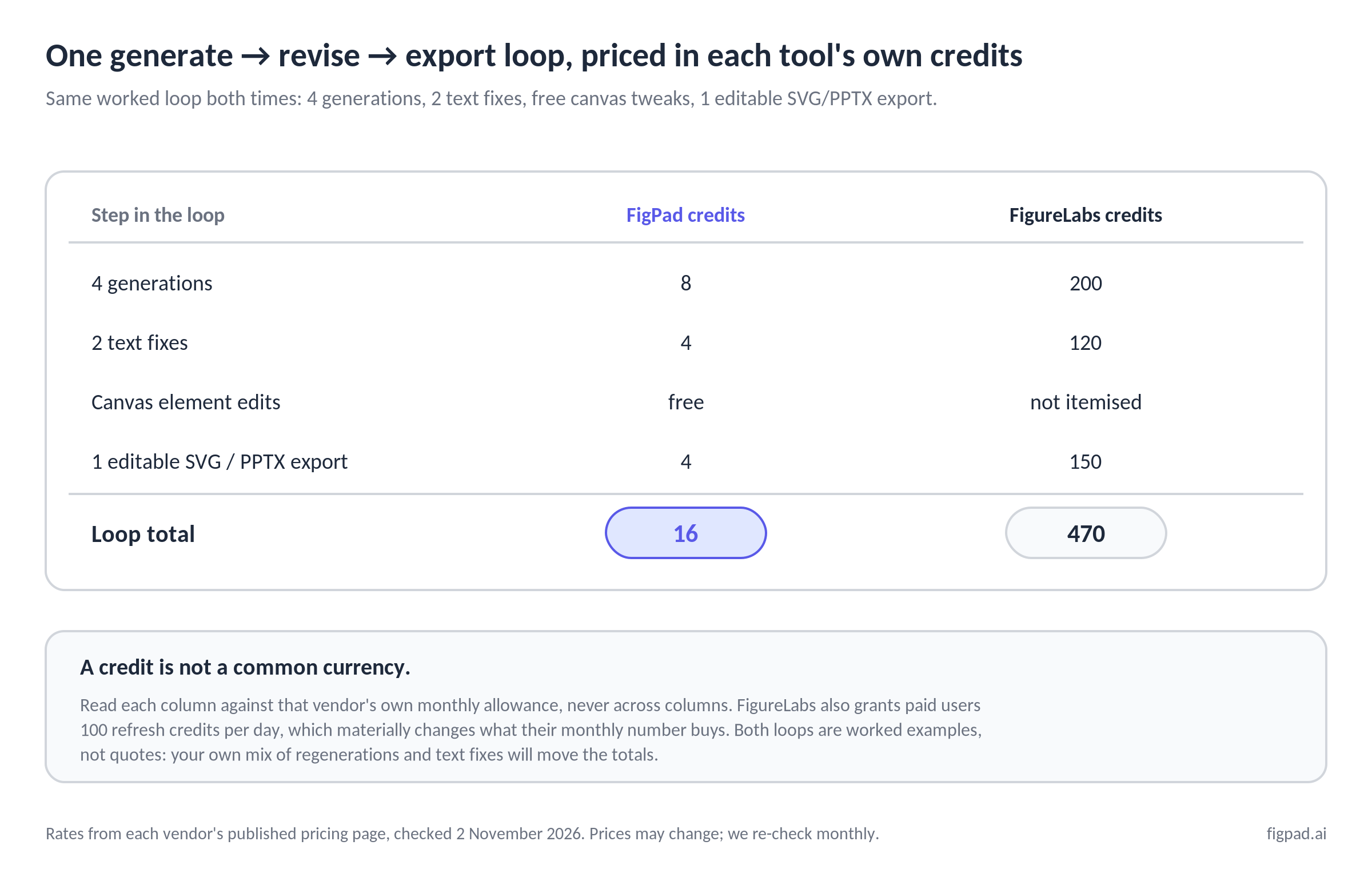
How FigPad fits
FigPad is built around the assumption that the figure will change after you first make it. You start from a prompt, a sketch, or a reference image, refine it on the canvas, and export to layered SVG, editable PPTX, or PNG and JPG at the resolution the model generates.
The credit model is what makes the revision loop cheap rather than tense. One generation costs 2 credits. A text fix costs 2. Editing elements directly on the canvas is free. Exporting an editable SVG costs 4 credits, and re-exporting the same version is free — there is no large per-export fee, so a typical generate–revise–export loop lands around 16 credits. Plus carries 450 credits a month and Pro 900, billed monthly or yearly, and Starter is a yearly plan with 2,400 credits a year. There are also one-time credit packs from $12 for 95 credits, and those credits never expire (checked 2026-11-02).
Layered SVG and editable PPTX export are available on every plan, including free, so the realistic comparison is the cost of a full loop rather than which tier unlocks vector. Beyond that, figures on free and paid plans come with publication rights and a free, verifiable Publication Authorization Certificate, with no separate "publication" plan and no per-figure charge, and FigPad's terms state that it does not use your inputs or output to train its own models.
If you are choosing a tool rather than a format, the AI Scientific Figure Generator page covers the generation side, and the BioRender Alternative comparison covers the manual-assembly-versus-AI-native tradeoff in more detail than a single table can. Every new account gets free credits with no credit card required, which is enough to generate a first figure and try the editing canvas before deciding anything.
When you should stay with BioRender
BioRender's icon library is its genuine advantage, and no AI generator has replaced it. If your figures live or die on anatomically vetted, visually consistent icons — immunology panels, organ systems, standard cell types drawn the way reviewers in your field expect — you are buying curation, not pixels, and that curation is real.
Stay with BioRender if any of these describe you:
- Your lab already has a shared BioRender library and a house style built on its icons. Consistency across a lab's output is worth more than a lower monthly bill.
- You assemble figures from known components rather than describing a novel mechanism. Manual assembly from a good library beats prompting when the parts already exist.
- You need slide decks and figures in one environment, with review and commenting, and you are already on a paid plan where PPTX export is included.
- Your collaborators cite BioRender in their methods and expect the visual grammar that goes with it.
Where the gap shows is vector: BioRender's help centre is explicit that illustration export offers no vector option at this time. If your target journal prefers vector artwork, or you need one master that scales from a column figure to an A0 poster, you will be working around that.
Key Takeaways
- Editable PPTX means native PowerPoint objects — text boxes, shapes and groups — not a picture pasted on a slide. Its value is that anyone in the room can make the fix.
- Pick the export by the next edit, not by the file. Text and layout changes in PowerPoint → PPTX. Precision vector work or a vector-preferring journal → layered SVG. Nothing will change → high-resolution PNG, exported at the size it will be shown.
- PPTX is a working format, not a submission preference. Elsevier accepts Office files but prefers EPS, PDF, TIFF or JPEG, and warns that non-standard fonts may be substituted and cause missing symbols or overlapping type.
- Check what your tool can actually export before you commit. As of November 2026, BioRender documents no vector export for illustrations and limits PPTX export to select paid plans, excluding posters.
- Compare credits inside one vendor's system, never across two. A per-export fee only matters relative to that plan's monthly allowance and how many revision rounds your reviewers actually generate.
