
Cell Press artwork is judged by what is inside each panel, not by the software that made it. A line drawing supplied as raster needs 1000 dpi, a line-plus-photo combination needs 500 dpi, and a plain halftone — a micrograph, a gel, a blot — needs 300 dpi, with vector EPS or PDF accepted at any size provided every font is embedded. Screen-optimised formats such as GIF, BMP, PICT and WPG are not accepted at all. The rules that cost authors the most time, though, are the ones that arrive late: a single-panel graphical abstract at 5.5 inches square and 300 dpi, Arial 12–16 pt, requested at final materials and published exactly as you send it. This guide covers what Cell Press and Elsevier state publicly as of October 2026, and which requirements quietly force a redraw.
One disclosure before the numbers. Cell Press hosts a consolidated figure guidelines page at cell.com/figureguidelines, and it would not load for us on 12 October 2026. Everything below comes from Cell Press and Elsevier author documents we could retrieve today — a Cell Press journal guide for authors, the Cell Press graphical abstract guidelines, and Elsevier's artwork sizing and glossary pages. Individual Cell Press titles publish their own figure guidelines page, so confirm the one for your journal before final upload. We would rather tell you which page we could not read than quote a number from a site that scraped it.
Why Cell Press figures bounce when the specs look simple
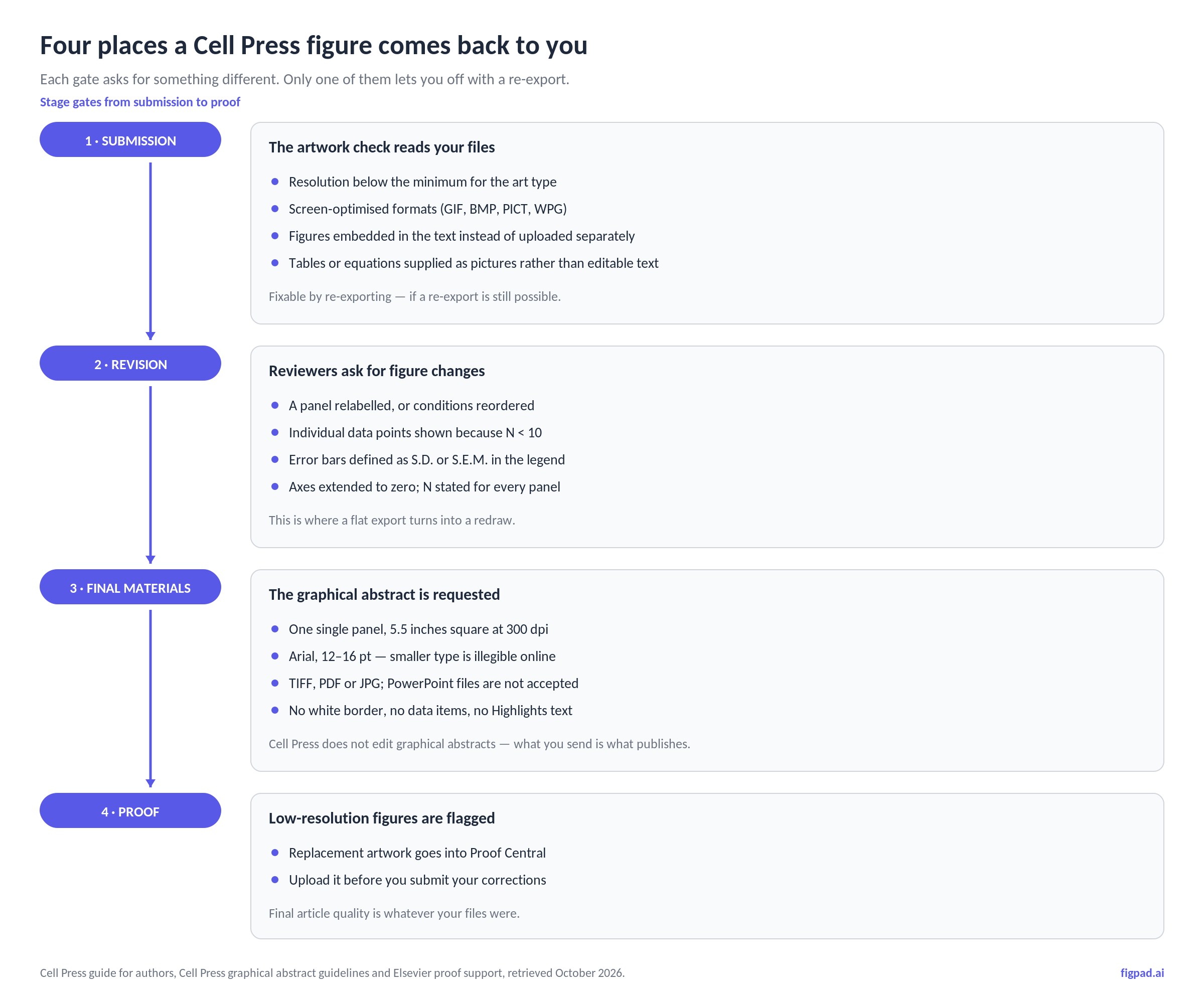
The spec sheet is short. The failure modes are not, because figure requirements at Cell Press are distributed across four different moments and each one asks for something the previous one did not.
At submission, the checks are mechanical: resolution, format, whether figures were uploaded as separate files rather than buried in the manuscript, whether tables and equations arrived as editable text rather than pictures of text. All of that is fixable by re-exporting — assuming you still have something to re-export from.
At revision, the asks become editorial. Reviewers want a panel relabelled, two conditions swapped, individual data points shown instead of a bar, error bars defined. None of that is a resolution problem. It is a source file problem, and it is the stage where authors discover that the figure they have is a flattened image.
At final materials, the graphical abstract appears — with its own dimensions, its own font rule, and the sentence that makes it unlike every other asset in your submission: Cell Press does not edit graphical abstracts, so the file you send is the file that publishes.
At proof, low-resolution figures get flagged, and Elsevier's instruction is to upload a higher-quality replacement in Proof Central before you submit your corrections. By then, "higher-quality" means going back to whatever you built the figure from.
The resolution rule: art type decides, not file type
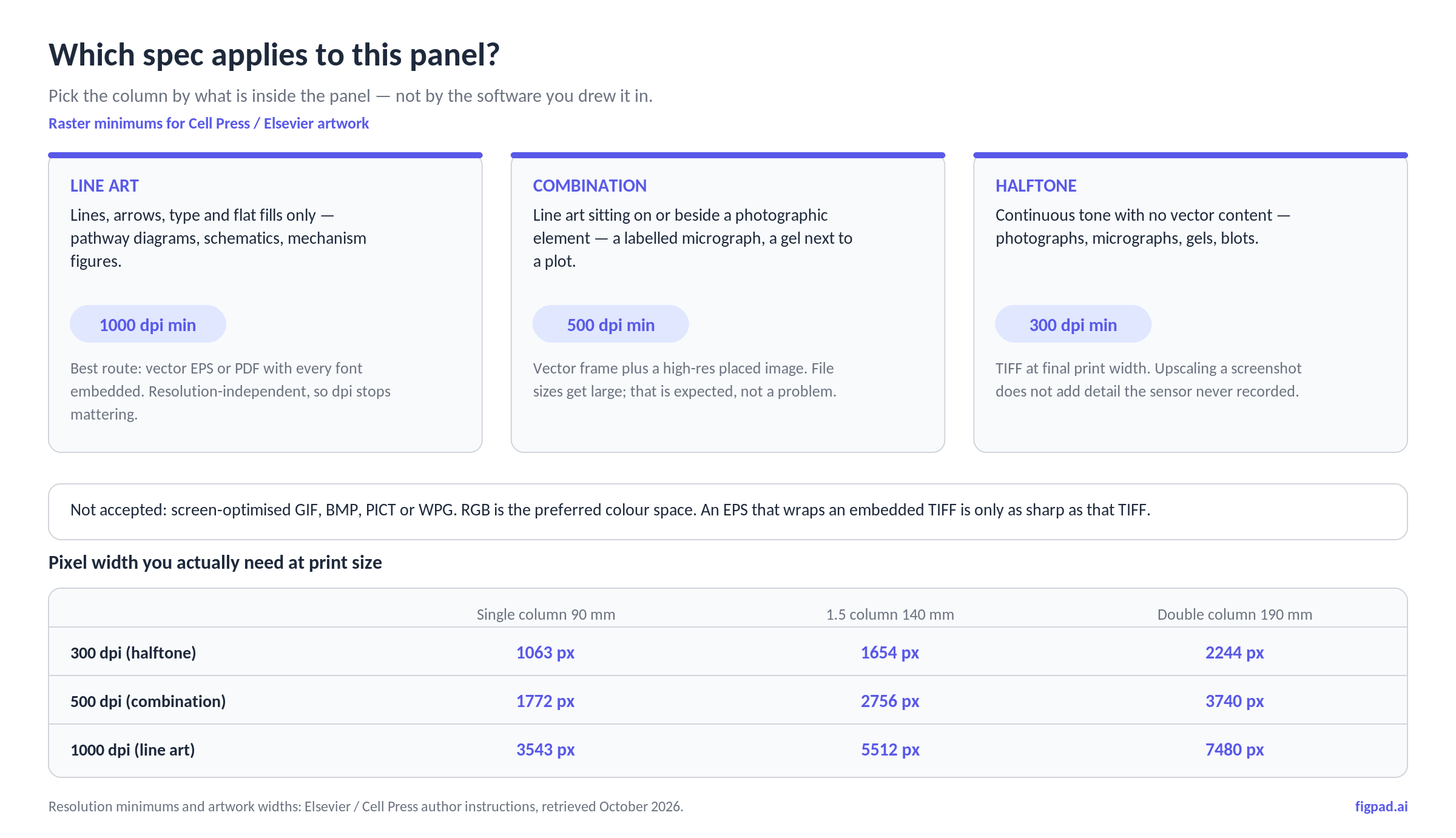
The single most useful thing to internalise is that Cell Press and Elsevier classify your artwork by content, then attach a resolution minimum to that class. From the Cell Press guide for authors:
- Line art — distinct lines, arrows, type and flat fills with no tonal gradation. Supplied as TIFF or JPEG bitmap, it needs 1000 dpi.
- Combination art — line work sitting on or beside a photographic element, such as a labelled micrograph or a gel next to a plot. 500 dpi.
- Halftone — continuous tone, no vector content: photographs, micrographs, gels, blots. 300 dpi.
- Vector EPS or PDF — accepted for drawings, with the explicit instruction to "embed all used fonts."
Two traps hide in that list. The first is that most mechanism diagrams, pathway figures and schematics are line art, which means the raster bar for them is not 300 dpi — it is 1000. The second is that an EPS is not automatically resolution-independent: Elsevier's own glossary notes that when an EPS contains an embedded bitmap such as a TIFF, that bitmap's dpi caps the whole file. Wrapping a 150 dpi screenshot in a vector container buys you nothing.
Elsevier's artwork sizing page gives the widths these resolutions multiply against: 90 mm for a single column, 140 mm for 1.5 columns, 190 mm for double-column full width (plus a 30 mm "minimal" size), with normal lettering around 7 pt at finished print size and sub- or superscripts no smaller than 6 pt. Those two numbers together are the actual requirement — a 1063-pixel-wide file is a legitimate 300 dpi single-column halftone, and a 1063-pixel-wide line drawing at the same width is nearly four times short.
On colour: RGB is Elsevier's preferred colour space for submitted artwork, usable colour figures appear in colour online at no charge even when print is greyscale, and artwork must be legible to readers with impaired colour vision. That last requirement is a design constraint, not a file-format one, and no export setting will fix a red–green heatmap for you.
The graphical abstract is the strictest asset you will submit
Cell Press publishes separate graphical abstract guidelines, and they are unusually specific:
- One single panel. Not a two-row storyboard, not a figure with (A) and (B).
- 5.5 inches square at 300 dpi — roughly 1650 pixels on a side. The square aspect ratio is load-bearing: the image is dropped into a square template online, and a non-square file may simply get its canvas extended.
- TIFF, PDF or JPG. PowerPoint files are not accepted.
- Arial, 12–16 pt. The guidelines say plainly that "smaller fonts will not be legible online."
- No data items. Everything in the panel should be graphical.
- No white border. A common rejection is an image pasted onto a large white background instead of the image itself.
One honest inconsistency worth knowing, because it trips people up: Cell Press's own Crosstalk blog states the graphical abstract as 1200 pixels square at 300 dpi, while the current graphical abstract guidelines PDF states 5.5 inches square at 300 dpi. Those are different canvases. Build at the larger size from the guidelines document, keep it square, and you satisfy both.
The content rules are editorial rather than technical, and they are the ones editors notice: give the image a clear start and end so it reads top-to-bottom or left-to-right, show the biological context (subcellular location, tissue, cell type, species), make it visually distinct from any model figure already in the paper, emphasise the new finding rather than prior literature, and leave speculative elements out unless their speculative nature is visually obvious. Because Cell Press does not edit graphical abstracts, every one of those is on you.
The figure-content rules most tools will not enforce for you
Cell Press's author guidance includes data-presentation requirements that have nothing to do with export settings and everything to do with whether a reviewer asks for a new version:
- Plot individual data points where possible, especially when N < 10.
- Describe error bars in the legend as S.D. or S.E.M.
- Extend axes to zero, except for log axes.
- Report statistics and p values only for independently repeated experiments, not for replicates within a single experiment.
- State the number of repeats (N) in the legend.
And the integrity rules, which apply at every stage: no specific feature may be enhanced, obscured, moved, removed or introduced. Brightness, contrast and colour-balance adjustments are allowed only where they do not obscure or eliminate information present in the original, and non-linear adjustments such as gamma changes must be disclosed in the figure legend.
What gets your artwork rejected: the 2026 shortlist
Collecting the above into the list worth checking before you upload:
- A line-art panel supplied as a 300 dpi raster instead of vector or 1000 dpi.
- A screen-optimised file type — GIF, BMP, PICT, WPG — or a JPEG whose compression has already eaten the detail.
- An EPS or PDF with fonts not embedded, or one wrapping a low-resolution bitmap.
- Figures embedded in the manuscript rather than uploaded as separate files, with captions supplied separately.
- Tables or equations submitted as images rather than editable text.
- A graphical abstract that is multi-panel, non-square, under-sized, set in small type, or padded with white space.
- Type that falls below roughly 6–7 pt once the figure is reduced to its printed width.
- A figure that cannot be revised, so a one-label reviewer request becomes a full rebuild.
Which file route actually satisfies Cell Press
As of October 2026, mapping the common delivery routes against what each gate asks for. Prices and publisher specs may change; we re-check monthly.
| Route | Submission artwork check | Reviewer relabel at revision | Graphical abstract | Honest catch |
|---|---|---|---|---|
| Vector EPS / PDF | Accepted for drawings; fonts must be embedded | Editable, if you still hold the source | PDF accepted | Resolution-independent only if nothing raster is embedded |
| Layered SVG master | Not a listed submission format — convert to PDF/EPS/TIFF | Every label, arrow and shape stays a separate object | Export to TIFF or PDF at 5.5 in / 300 dpi | You must do the conversion step yourself |
| TIFF at final width | Accepted at 300 / 500 / 1000 dpi by art type | Flat — text is pixels | Accepted | Correct resolution, zero editability |
| PNG from an AI image tool | Not a listed format; usually under-resolution | Flat — a redraw | Not listed | Looks finished, fails at the first revision |
| PowerPoint / Office file | Office files accepted by some Cell Press titles "as is" | Objects editable if they were never flattened | Not accepted for the GA | Fine for talks, wrong for the GA |
The pattern across that table is the point of this article: the formats that pass the submission check most easily are the ones that fail hardest at revision, and the stage that costs you a week is revision.
How FigPad fits
FigPad is built around the gap that table exposes — generating a figure is the easy half, and keeping it changeable is the half that decides whether a reviewer comment costs ten minutes or a weekend. You describe the figure in a prompt, upload a sketch, or hand it a reference image, and the output stays editable: layered SVG where each label, arrow and shape is its own object (available on every plan, including free), PPTX where graphics land in slides as editable objects, and PNG or JPG at the resolution the model generates.
For Cell Press specifically, the practical route is to keep a layered SVG as your master and convert at the end: SVG to PDF or EPS for line-art panels, SVG to a TIFF at final print width for anything that has to be raster, and a square export at 5.5 inches and 300 dpi for the graphical abstract. When reviewer 2 asks for "Panel C relabelled and the conditions in the other order," you edit the object, not the pixels, and re-export — rather than rebuilding a mechanism diagram from scratch with the AI scientific figure generator or any other tool.
The credit economics match that workflow rather than punishing it. As of November 2026, one generation costs 2 credits, a text correction costs 2 credits, editing elements on the canvas is free, and exporting an editable SVG costs 4 credits with repeat exports of the same version free — so a typical generate-revise-export cycle runs around 16 credits. Pricing starts at $12/month billed yearly; Plus is $20/month billed yearly or $29 month-to-month, Pro is $29/month billed yearly or $49 month-to-month, and one-time credit packs start at $12 for 95 credits (prices checked 2026-11-02). Figures on free and paid plans come with publication rights, with no per-figure fee. Every new account gets free credits with no credit card required.
One caveat we will not soften: some journals ask authors to disclose AI-assisted figure creation. Check your target Cell Press title's policy, and never present a generated image as primary experimental data.
When you should stay with Illustrator
If your figures are already built as layered Illustrator or Inkscape documents and your lab has a working template, there is no reason to move. A vector editor you know gives you precise control over line weights, exact millimetre widths, colour profiles and the EPS/PDF export options Cell Press lists first — and it has no credit meter. The case for a generation tool is upstream of that: producing the first draft of a diagram that does not exist yet, converting a flat reference image into editable vectors, and avoiding the two-day build before the file is even ready to be refined. Many authors end up doing both — generate and iterate in one place, then do final millimetre-level adjustment in the editor they already trust.
Key Takeaways
- Cell Press sets resolution by art type, not by file type: 1000 dpi for raster line art, 500 dpi for combination art, 300 dpi for halftone, with vector EPS or PDF accepted when every font is embedded.
- Width matters as much as dpi — 90 mm single column, 140 mm at 1.5 columns, 190 mm full width, with body lettering around 7 pt and nothing below 6 pt at final size.
- The graphical abstract is the strictest asset: one panel, square, 5.5 inches at 300 dpi, Arial 12–16 pt, TIFF/PDF/JPG, no white border — and Cell Press does not edit it.
- Most rejections are editability failures in disguise: the submission check is a re-export problem, but a reviewer relabel on a flattened figure is a rebuild.
- Specs and publisher pages change. Confirm your specific Cell Press title's figure guidelines page before final upload rather than trusting a summary, including this one.
