

Checked on biorender.com/pricing on 27 August 2026, BioRender's Academic Individual plan is $35/month billed annually — $420 a year — or $39 month-to-month. That headline number is real, but it is a floor, not a total. AI figure generation is a separate add-on starting at $5/month on academic plans, and BioRender Graphing is another $15 per seat per month. Meanwhile BioRender's own help centre states there is "no vector export option at this time": illustrations come out as PNG, JPEG, or PDF, at up to 600 DPI for premium users. So the real question is not whether $420 is expensive. It is whether $420 buys you a figure you can still edit in eighteen months, in a file format Nature will accept without a fight. Here is the arithmetic.
Where the $35 actually comes from
BioRender splits pricing by who signs your paycheque, and the gap is enormous. As of 27 August 2026, on the academic side: Free is $0 and caps you at 3 figures and 1 Graphing file with no commercial use or publication; Academic Individual is $35/month billed annually ($420/year) or $39 month-to-month; and the Lab plan is $99/month billed annually for five seats, $129 monthly, with extra seats at +$20/month. On the industry side the same product costs $95/month annually or $115 monthly for one seat, and Team runs $475/month annually for five seats.
Discounted Student, Postdoc, and Undergraduate tiers exist — the Undergraduate plan bills in four-month cycles at $20 — but BioRender's help centre is explicit that these are for people paying out of pocket. If your department reimburses you, you do not qualify and you are back at $420. Prices may change; we re-check monthly.
Two footnotes matter more than the headline. First, the 14-day trial requires a credit card. Second, if your university has an institutional deal, none of this applies to you — more on that below, because it is the single strongest reason to stay.
The three costs that never make it into the spreadsheet
Add-ons. The features most people now assume are "the AI part" of BioRender are priced separately. AI-assisted figure generation is listed at $5/month as a starting annual price on academic plans ($25/month on industry). BioRender Graphing is $15 per seat per month academic ($49 industry). A postdoc who wants the plan, the AI, and the graphing tool is looking at roughly $420 + $60 + $180 = $660 a year, not $420. That is still defensible for a tool you use weekly. It is just not $35.
The format ceiling. BioRender's export help article, last updated 25 August 2026, lists PNG and JPEG for all users, PDF for premium subscribers, and resolution options of 72, 150, 300, and 600 DPI, with 600 reserved for paid plans. Then, in a grey callout: "🚫 Note: There is no vector export option at this time." For graphs specifically you can get SVG out of the Graphing add-on, but the illustration canvas — the actual figure — does not produce vector.
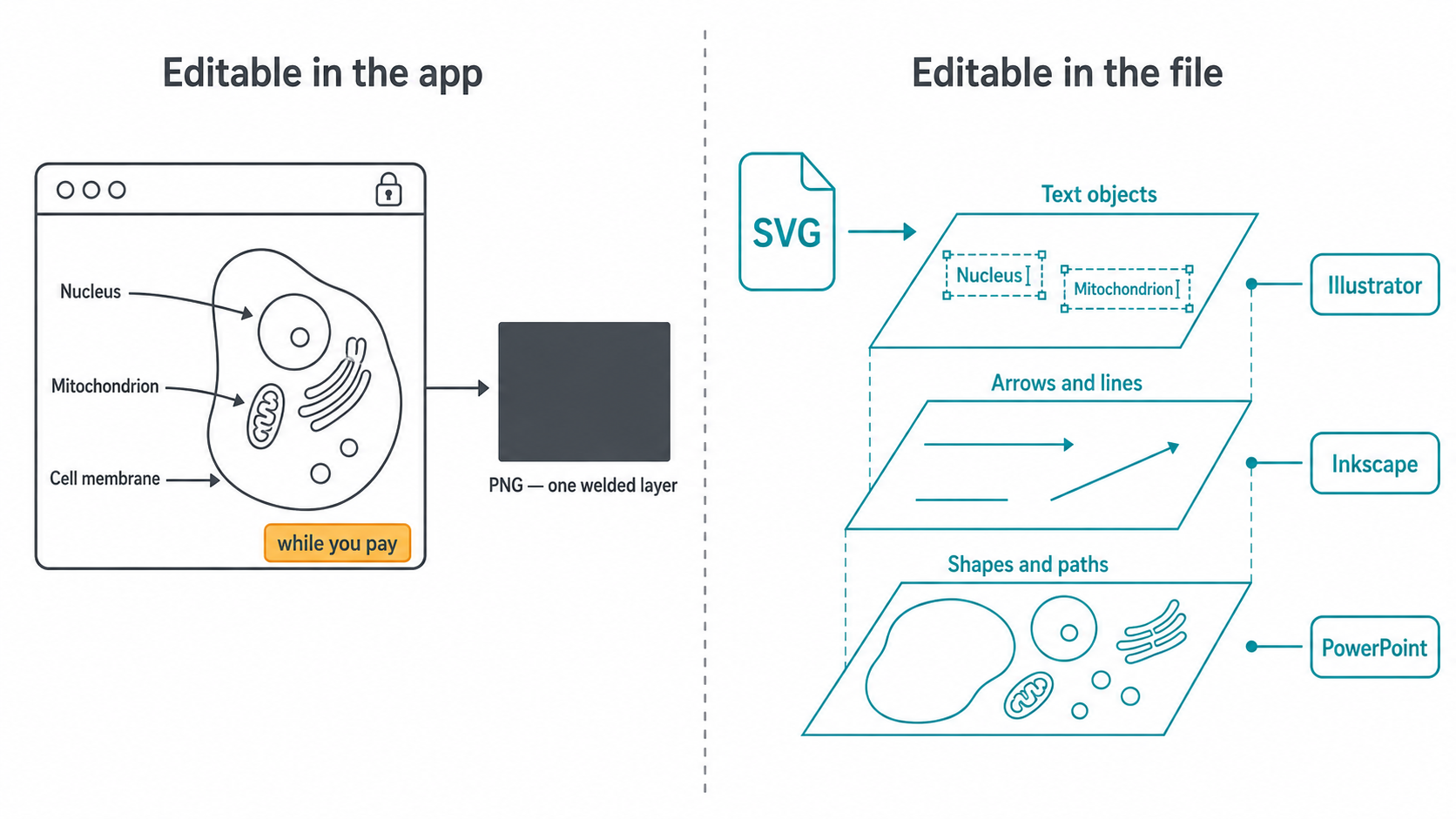
Editability that lives on someone else's server. Everything in BioRender is beautifully editable inside BioRender. Icons separate, labels retype, colours change. The moment you stop paying, or a co-author at another institution needs to move a label, that editability evaporates and what you have is a PNG. This is not a bug; it is the business model. But it is a cost, and it is the one that bites during revisions.
What $420 a year genuinely buys you
Being fair about this matters, because the case for BioRender is strong and most people searching "is BioRender worth it" have already used it.
You get unlimited figures and unlimited objects, full version history, permission to publish in journals, on personal academic websites, in grant applications, and in non-profit textbooks up to 5 figures. You get transparent-background and watermark-free exports at up to 600 DPI, premium bio-brushes for membranes, colour gradients, protein 3D models from the PDB, multi-canvas slides, unlimited use of the PowerPoint add-in, shared folders and commenting, and live customer support.
More importantly, you get the icon library — around 40,000 scientifically vetted assets, per Michigan State University's licensing page — and the visual conventions that come with it. BioRender says it is used by over four million scientists. When a reviewer in your subfield has seen the same membrane bilayer motif in three hundred papers, a figure built from that vocabulary reads as competent before anyone reads the labels. That standardisation is genuinely valuable and no AI generator replicates it by accident.
The number that actually matters: cost per revision cycle
Divide $420 by the number of figures you publish in a year and BioRender looks either cheap or absurd. A PI shipping four papers with six figures each is paying about $17.50 per figure. A second-year PhD student who publishes one paper is paying $420 for maybe five figures.
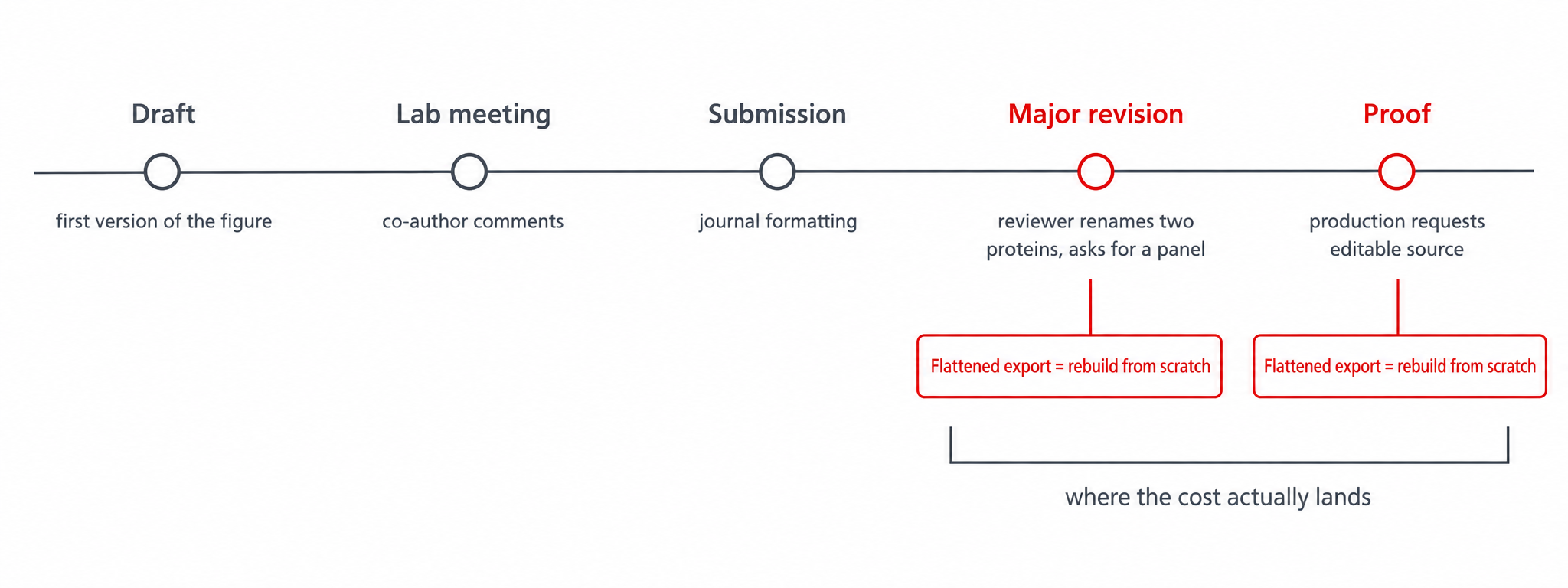
But annual cost per figure is the wrong denominator. The right one is cost per revision cycle, because that is where figure work actually happens. A typical trajectory: draft figure, lab meeting, co-author comments, submission, desk-reject, reformat for a second journal, major revision, reviewer asks you to rename two proteins and add a panel, proof stage, production asks for the editable source file.
Nature's author guidance asks for vector files with editable layers — .ai, .eps, .pdf, .ps, .svg — precisely so production staff can adjust lines, arrows, scale bars and text to house style. A flattened raster figure is the format that makes that step painful for everyone. If your tool cannot produce vector, you are either recreating the figure elsewhere at proof stage or accepting whatever the 600 DPI PNG looks like in print.
So a quick sorting rule, by how much figure work you actually do:
- One paper a year, figures mostly borrowed conventions. $420 is hard to justify against a discounted student tier or a cheaper generation-first tool. Check your institution first.
- Two to four papers a year, dense schematics, stable subfield. BioRender earns its money on icon lookup time alone, assuming you are not fighting the export format.
- Heavy revision load, multi-institution co-authors, or figures reused in talks and posters. The exported file format becomes the constraint, and this is where a vector-out workflow starts to pay for itself.
- Industry. At $95/month billed annually per seat, the same calculation runs at roughly three times the stakes, and the vector question gets sharper because agency and regulatory partners expect editable source.
The honest comparison table
Everything below was checked on the vendors' own pages on 27 August 2026. Prices may change; we re-check monthly.
| BioRender Academic Individual | BioRender Free | FigPad paid plans | |
|---|---|---|---|
| Headline price | $35/mo billed annually ($420/yr); $39 monthly | $0 | $9–31/mo billed annually; $19–39 month-to-month |
| Publication rights | Yes — journals, grants, academic sites, ≤5 textbook figures | No — no publication or commercial use | Included on every paid plan |
| Figure limit | Unlimited | 3 figures, 1 Graphing file | Credit-based, varies by plan |
| Raster export ceiling | 600 DPI (premium only) | 300 DPI, watermarked | 2K–8K PNG depending on plan |
| Vector export (SVG) | No — "no vector export option at this time" | No | Layered SVG on Plus tier and above |
| Editable PPTX export | PowerPoint add-in; slides inside the app | No | Yes |
| AI figure generation | Paid add-on from $5/mo academic | Limited free AI credits | Core product |
| Icon library | ~40,000 vetted life-science icons | Same library, watermarked output | No curated icon library |
| Where editability lives | In the app, while you subscribe | In the app | In the exported file |
The table is not a verdict. It is two different products that happen to compete for the same budget line. BioRender sells a curated assembly environment. Tools like FigPad sell an exported artefact you can take anywhere.
How FigPad fits
FigPad approaches the problem from the file end. You start from a prompt, a whiteboard sketch, or a reference image, and the AI scientific figure generator produces a first draft — then you vectorise it into a layered SVG or editable PPTX where each label, arrow and shape is its own object. PNG export runs from 2K to 8K depending on plan. There is also a vectorizer for turning an existing bitmap figure into editable paths, and a PDF-to-poster path that ingests a manuscript (up to 80MB, parsing the first 30 pages) for conference posters.
The practical difference shows up at 11pm the night before a resubmission. If a reviewer asks you to rename TGF-β1 to TGF-β2 across four panels, an SVG opens in Illustrator, Inkscape, or a browser-based editor and you retype four text objects. A PNG means recreating the panel. That is the whole pitch, and it is worth being blunt that it only matters if you actually revise figures — which, if you are reading this at all, you probably do.
Every FigPad paid plan includes publication rights, and vector export is available from the Plus tier upward. If you are weighing this specifically against BioRender, the side-by-side lives on the BioRender alternative page; if your immediate job is a journal-facing summary figure, start at the graphical abstract generator instead.
When you should stay with BioRender
Four situations where switching is the wrong call, and we would rather say so than lose your trust later.
Your institution already pays. Michigan State, for example, offers BioRender to faculty and students at a subsidised $138.22 per user per year through its tech store. Plenty of universities have similar site licences or full institutional deals. At $138 — or $0 — the cost argument disappears entirely and you should just use it.
You need the icon library specifically. If your figures are dense immunology or cell-signalling schematics built from receptors, cytokines, and organelles that must be instantly recognisable, 40,000 vetted icons is a moat. No generative tool gives you that vocabulary reliably, and reviewers notice when a figure invents its own visual grammar.
Your lab collaborates inside one canvas. Shared folders, commenting, version history, and a PI who reviews figures in-app are real workflow. Exported files do not replicate that.
You are submitting to a venue that restricts AI-generated imagery. BioRender's own AI page says it plainly: most major journals restrict or prohibit fully AI-generated scientific figures, and the NIH explicitly prohibits grant applications developed by AI, including AI-generated figures. Check your target journal and funder before you generate anything. A manually assembled BioRender figure carries no such question mark, and that is a genuine advantage no pricing table captures.
Key Takeaways
- $35/month is the floor, not the total. As of 27 August 2026, BioRender Academic Individual is $420/year annually or $39/month monthly; AI generation (from $5/mo) and Graphing ($15/seat/mo) are separate add-ons.
- The free plan cannot be published from. Three figures, no commercial or publication use — it is a demo, not a tier.
- There is no vector export from the illustration canvas. BioRender's help centre says so directly, which matters because Nature asks for vector files with editable layers.
- Cost per revision cycle beats cost per figure. The expensive part of a figure is the fourth time you edit it, not the first time you make it.
- If your institution has a licence, stay. At MSU's subsidised $138.22/user/year — or a free site licence — the economics stop being the argument, and the icon library wins.
