

Yes, you can build a scientific figure in Canva, and for a conference poster or a lab-meeting slide it is often the fastest tool you have. For a manuscript figure the answer narrows fast. Nature's research figure guide asks for main figures as vector files with editable layers — .ai, .eps or .pdf preferred, with .svg, PowerPoint and Excel also accepted — and states outright that .jpeg, .tiff and .png are not accepted, with all text left editable and un-outlined at 5–7 pt. Canva's defaults point the other way: PNG and JPG are the standard exports, SVG is gated behind a paid plan, PPTX export only works from presentation-type designs, and PDF Print is the only download Canva documents at 300 DPI. That gap is where most Canva figure workflows break — usually two days before a revision deadline.
Why researchers reach for Canva in the first place
The reasons are good ones, and worth stating before the criticism.
Canva opens in a browser, has no learning curve worth the name, and has a template for every canvas size a conference will ever ask for. Alignment guides, snapping, and multi-page documents work the way you expect. If you have ever spent forty minutes fighting Illustrator's artboard panel, Canva feels like relief. Most labs already have someone with an account, and the collaborative editing is genuinely better than emailing figure_final_v7.pptx around.
For posters, slides, lab-website graphics, and social media summaries of a paper, that is often the whole story. Canva is a legitimately good answer to those jobs.
The problem is that a manuscript figure is not a design deliverable. It is a file that has to survive a production editor's automated artwork check, then survive a reviewer asking you to relabel panel C, then survive being scaled to 89 mm without turning to mush. Those are different requirements, and Canva was not built for them.
What Canva actually exports, and what journals actually accept
This is the section that decides the question, so here are the primary sources rather than opinion.
Nature's accepted formats for main figures (Nature research figure guide, checked September 2026):
- Preferred:
.ai,.eps,.pdf— "please choose to retain all editing capabilities" - Also acceptable: layered Photoshop, PowerPoint (save to PDF first),
.svg, Excel,.ps - Not accepted:
.jpeg,.tiff,.png, Canvas, DeltaGraph, Tex, ChemDraw, SigmaPlot, CorelDraw - Fonts: standard faces such as Arial or Helvetica, 5 pt minimum and 7 pt maximum, embedded, not outlined
- Sizing: 89 mm single column, 183 mm double column, 170 mm maximum height, files under 50 MB
Canva's download options (Canva Help Center, checked September 2026):
- JPG and PNG with quality/scale sliders — PNG offers 0.5×, 1×, 2× or 3× scale, and there is no DPI field
- SVG — listed as limited to Pro, Teams, Business, Education and Nonprofits accounts
- PDF Standard at 96 DPI; PDF Print at 300 DPI with bleed, crop marks and an RGB/CMYK profile choice
- PPTX — "for presentations only. Downloading as PPTX is currently not supported for other design types"
- Quality sliders, scale, compression, CMYK and transparent PNG/SVG are all paid-plan features
Line these up and the verdict writes itself.
PNG is the default, and it is on the rejection list
Canva's PNG export is what most people click. For Nature main figures it is explicitly not accepted, and most large publishers take a similar line for line art and schematics. Worse, PNG gives you a scale multiplier rather than a resolution target, so hitting "300 DPI at 183 mm" means doing the arithmetic yourself: 183 mm ≈ 7.2 in, so you need roughly 2,160 px of width, and you have to build the canvas so that 2× or 3× lands there. Nothing tells you if you missed.
PDF Print is your best Canva route, with one thing to verify
If you are going to submit something made in Canva, PDF Print is the export to use: it is the only one Canva documents at 300 DPI, and PDF is on Nature's preferred list. But Nature's requirement is a PDF that retains editing capabilities — live text objects, separable strokes. Canva does not document whether its PDF export preserves editable text or flattens it. Open your export in Inkscape or Illustrator and click a label before you submit. If the label selects as text, you are fine. If it selects as a picture, production will ask you to resupply.
SVG is paywalled, and vector-ness is not transitive
SVG export requires a paid Canva plan. That is a reasonable business decision, but it changes the free-tier calculus completely: on Canva Free you cannot produce a vector figure at all.
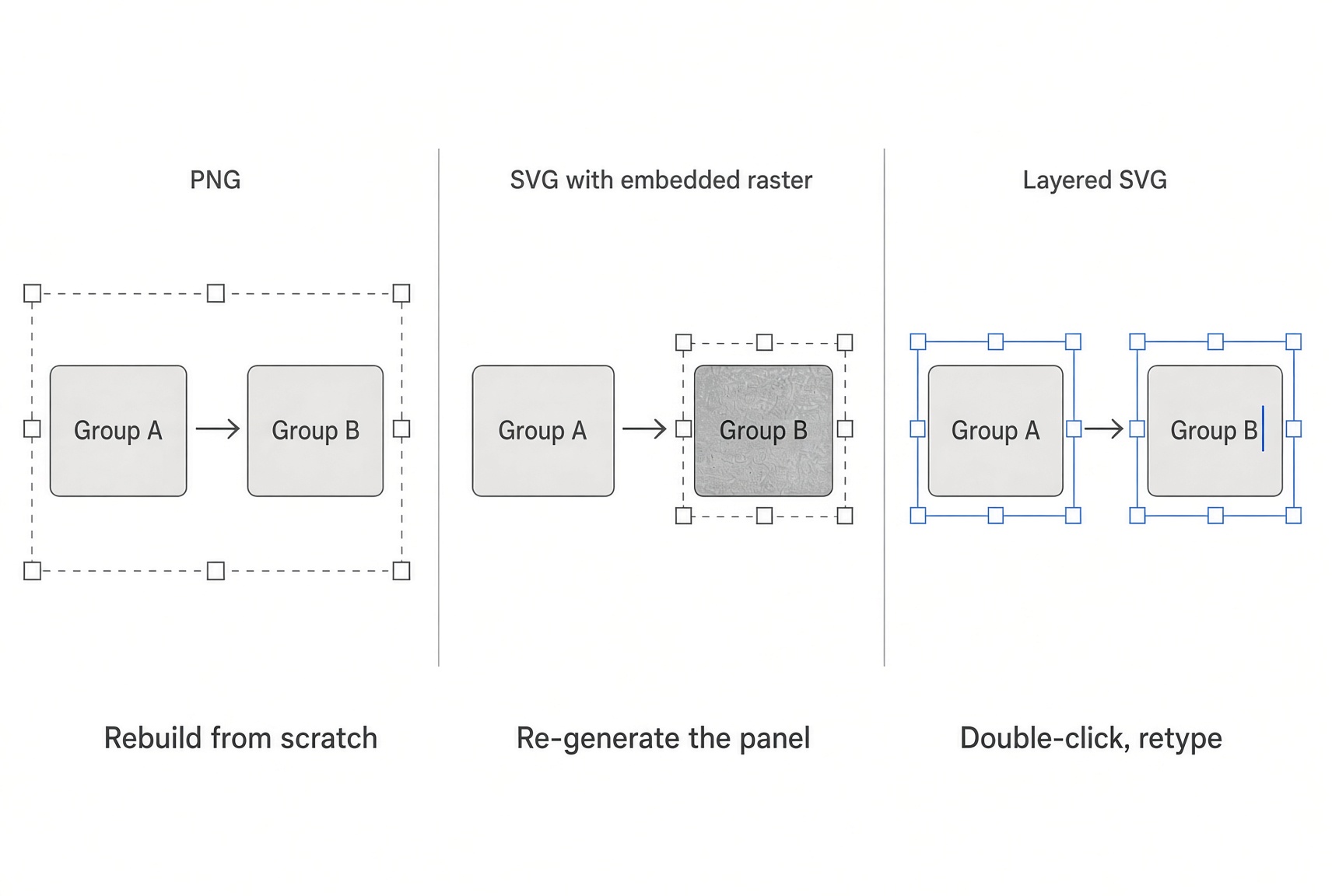
The subtler issue is that an SVG is only as editable as what you put in it. If your schematic is built from Canva's vector shapes and text boxes, the SVG will be genuinely editable. If any part of it is a photograph, an uploaded panel, or an image from Canva's AI image tools, that part stays a raster block inside the SVG file. You get a vector wrapper around a flat picture — which passes a file-extension check and fails the moment an editor tries to restyle a label.
PPTX only exists if you started in a presentation
Canva's help centre is unambiguous: PPTX download works for presentation design types and not for others. So the natural academic move — build a figure on a custom mm canvas, export to PowerPoint for the lab meeting — is not available. You would have to rebuild the figure inside a presentation document. Canva also warns that PPTX exports may look different in PowerPoint and that you may need to install the fonts you used.
Four more frictions nobody warns you about
The element library is a marketing library. Canva's catalogue is enormous and very good at what it is for. It is not a curated, scientifically reviewed set of organelles, receptors, model organisms or anatomical cross-sections. Searching "mitochondria" in a general design library gets you decorative shapes, not something you would put next to a Western blot. You will end up drawing the biology yourself.
Fonts. Nature asks for Arial or Helvetica, embedded, un-outlined, 5–7 pt. Canva's typography strengths are display faces and pairings. You can pick a plain sans, but you are working against the tool's grain, and font embedding behaviour on export is not something Canva documents for print-production purposes.
Postdocs and PhD students do not get free Canva. Canva Education is free for K–12 educators, their students, and qualifying schools and districts. Canva's own eligibility page says it is not currently available for higher-education teachers and institutions; universities are pointed at Canva for Campus, a separate paid product. If your mental model was "Canva is free for academics," it is not, at least not for anyone writing a thesis.
The content licence has a standalone-use clause. Canva's Content License Agreement prohibits using library content on a standalone basis — roughly, a single library asset with minimal additions, or content resold as-is. A multi-panel figure built from many elements plus your own data is a composition and normally fine, but if a figure is essentially one Canva illustration with two labels on it, read the licence before it appears in a published paper.
Canva vs a figure-first workflow, as of September 2026
Prices below were checked in September 2026. Canva's public pricing page renders prices dynamically and varies by region, so treat the Pro figure as indicative and check yours. Canva's own help pages list Canva Business at US$20 per person per month; Canva Pro is widely listed at about US$18/month month-to-month in the US. FigPad figures are from FigPad's pricing page. Prices may change; we re-check monthly.
| Canva Free | Canva Pro | FigPad (Plus) | |
|---|---|---|---|
| Cost | $0 | ~$18/mo month-to-month (region-dependent) | $25/mo month-to-month, or $15/mo billed annually |
| Vector export (SVG) | ❌ Not available | ✅ SVG export | ✅ Layered SVG (Plus and Pro tiers) |
| Text stays text in vector | ✅ For native shapes/text | ✅ For native shapes/text | ✅ Labels, arrows and shapes stay separate objects |
| Editable PPTX | Presentation designs only | Presentation designs only | ✅ Any figure, objects stay editable on the slide |
| Documented 300 DPI export | PDF Print only | PDF Print only | PNG up to 4K (Plus); 8K on Pro; 2K on Starter |
| Raster → editable vector | ❌ | Converter available | ✅ Vectorizer built into the figure workflow |
| Science-specific illustration | General design library | General design library | Prompt / sketch / reference image → scientific figure |
| Free for grad students | Free tier, no vector export | ❌ (Education is K–12 only) | Free credits on signup, no card required |
| Publication rights | Content Licence, no standalone use | Content Licence, no standalone use | ✅ All paid tiers; ToS: "you own the outputs generated for you" |
The honest reading: Canva Pro and FigPad Plus cost roughly the same. You are not choosing on price. You are choosing whether your tool's default output is a design file or a figure file.
How FigPad fits
FigPad exists because of the revision problem specifically. The workflow is prompt, sketch, or reference image in — layered SVG and editable PPTX out, where a label is still a text object, an arrow is still an arrow, and a reviewer asking you to rename "Group B" to "Vehicle control" costs you one double-click rather than a rebuild. That is the entire product thesis, and it maps directly onto Nature's "editable layers, do not outline text" requirement.
Three practical differences from a general design tool:
- Editing on the canvas is free. Per FigPad's pricing FAQ, a generation costs 2 credits and a text correction costs 2, but moving, restyling and relabelling elements on the canvas costs nothing. Exporting an editable SVG is 4 credits, and re-exporting the same version is free. A typical generate → revise → export loop runs about 16 credits.
- You can start from a bitmap. The vectorizer turns an existing raster panel into editable vector objects, which is the usual escape hatch when the only copy of a figure is a PNG from a former lab member.
- The starting point is scientific. The AI scientific figure generator and the graphical abstract generator are built around pathways, mechanisms and study designs rather than social-media templates, and every paid tier includes publication rights with no per-figure fee.
Two caveats, stated plainly. FigPad's PDF-to-poster feature caps uploads at 80 MB and parses only the first 30 pages, so a long thesis PDF needs trimming first. And some journals now ask authors to disclose AI-assisted figure creation — check your target journal's policy, and never present a generated illustration as raw experimental data.
When you should stay with Canva
Do not switch for the sake of switching. Canva is the better tool when:
- You are making a conference poster or a talk. Canva's layout tools, template range and print integration are excellent, and posters are not subject to journal artwork checks.
- Design polish is the deliverable. Lab websites, recruitment flyers, grant-outreach one-pagers, department newsletters. Canva wins these outright.
- You are collaborating with non-scientists. Everyone already knows how to use it. That has real value.
- Your figure is a data chart, not an illustration. Neither Canva nor an AI figure tool should be making your box plots — use R, Python or GraphPad and export vector.
- Your institution has Canva for Campus. If the licence is already paid for and your figures are schematic-light, the marginal benefit of another tool may be small.
The line is roughly this: Canva for things people look at, a figure-first tool for things editors process.
Key Takeaways
- Canva's default export is on the rejection list. Nature does not accept .png, .jpeg or .tiff for main figures; it wants vector with editable layers and un-outlined text at 5–7 pt.
- PDF Print is Canva's only documented 300 DPI export. PNG offers a 0.5×–3× scale multiplier, not a resolution target, so you compute the pixel width yourself.
- SVG export requires a paid Canva plan, and any raster content inside the design stays raster inside the SVG — a vector wrapper is not a vector figure.
- PPTX export only works from presentation-type designs, so a custom-size figure canvas cannot be handed to PowerPoint without rebuilding it.
- Canva Education is K–12 only. Higher-education staff and students are routed to the paid Canva for Campus product, which puts Canva Pro and FigPad Plus in the same price band — so choose on output format, not cost.
