

Most "best AI graphical abstract generator" lists rank tools by how good the output looks in a screenshot. That is the wrong axis. Elsevier's graphical abstract instructions ask for a minimum of 1328 × 531 pixels at 300 dpi and name TIFF, EPS, PDF or MS Office files as the preferred types. Cell Press asks for an exact 1200 × 1200 pixel square at 300 dpi. Both are trivial for a vector or layered file and precarious for a flat PNG. Then the reviewer asks you to rename one label, and the format question becomes a schedule question. This comparison covers eight tools researchers actually reach for in 2026 — BioRender, Mind the Graph, FigPad, FigureLabs, SciSpace, Canva, Adobe Express, and general image models like ChatGPT and Gemini — ranked on the only question that survives contact with peer review: what file comes out, and can you still edit it six weeks later?
The failure mode is not ugly output — it's a flattened one
Nobody abandons a graphical abstract tool because the first draft looked bad. They abandon it at 11pm on the day the revision is due, when the editor's letter says the third panel label should read "AAV9" instead of "AAV2," the only artifact they have is a 4096-pixel PNG, and the tool that made it cannot reproduce the same layout with one word changed.
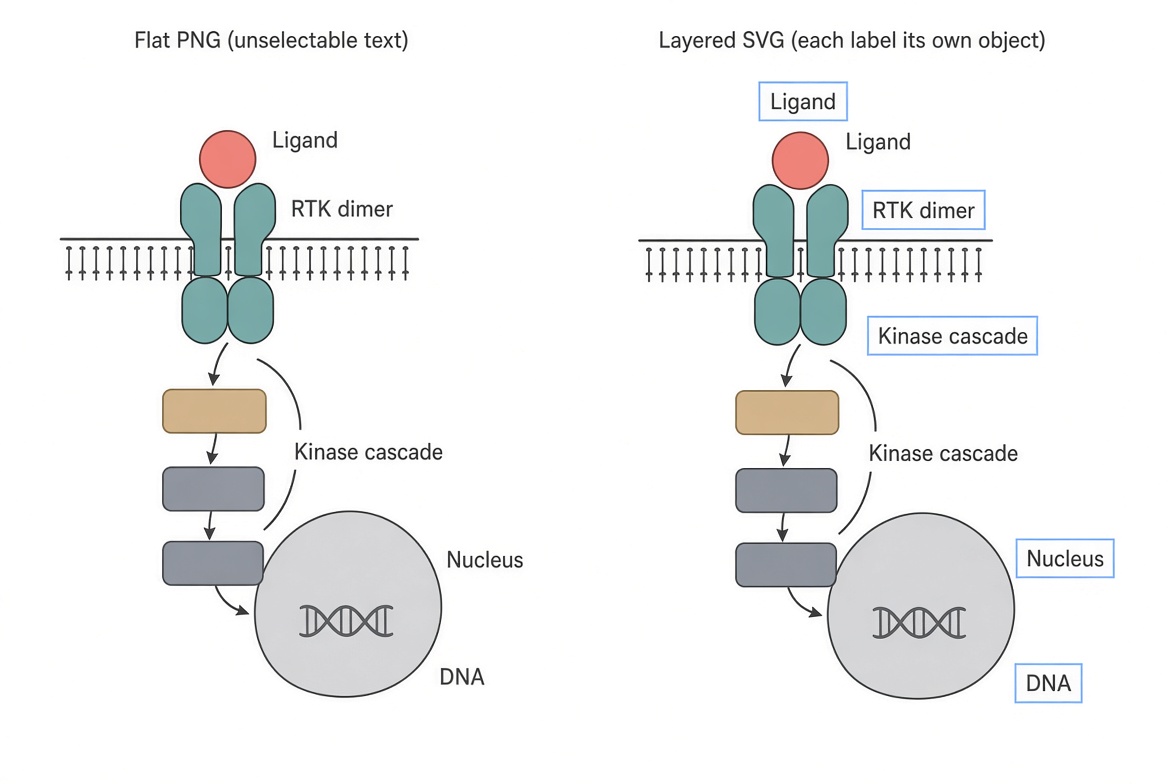
This is the structural problem with the current generation of AI figure tools. Generation is cheap and getting cheaper. Regeneration is not the same as editing: a fresh generation from a nudged prompt gives you a different picture, not the same picture with a corrected label. If your output is a single flattened raster, every correction — a typo, a renamed gene, a swapped arrow direction, a journal asking for Arial instead of Helvetica — is either a full redo or a manual patch job in Photoshop.
The tools that survive revision cycles are the ones that hand you a file where the label is still a text object, the arrow is still an arrow, and the panel is still a group you can move.
What journals actually accept in 2026
Worth pinning down before comparing tools, because the specs quietly favour one kind of output.
Elsevier (guidance current as of September 2026): minimum 1328 × 531 px (w × h) at a minimum of 300 dpi; larger images must keep the same 500:200 ratio, because the image is scaled into a 500 × 200 pixel window on ScienceDirect. Fonts must be Times, Arial, Courier or Symbol, set large enough to survive that reduction. Preferred file types are TIFF, EPS, PDF or MS Office files — meaning a PowerPoint file is a legitimate graphical abstract deliverable at Elsevier, not a workaround. No additional text, outline, or a heading reading "Graphical Abstract" inside the image.
Cell Press: an exact 1200 × 1200 px square at 300 dpi, in TIFF, PDF or JPG, with Arial at roughly 8–12 points.
Two consequences. First, the same figure has to be re-laid-out for different publishers — a 500:200 letterbox for Elsevier, a square for Cell. If your artifact is vector or layered, that is a repositioning job. If it is a PNG, it is a redraw. Second, Elsevier explicitly requires that any use of generative AI in producing a graphical abstract comply with its generative AI policies for journals. Check your target journal's disclosure rules before you submit; several publishers now ask authors to declare AI-assisted figure creation, and no generated illustration should ever stand in for primary experimental data.
The eight tools, grouped by what they actually are
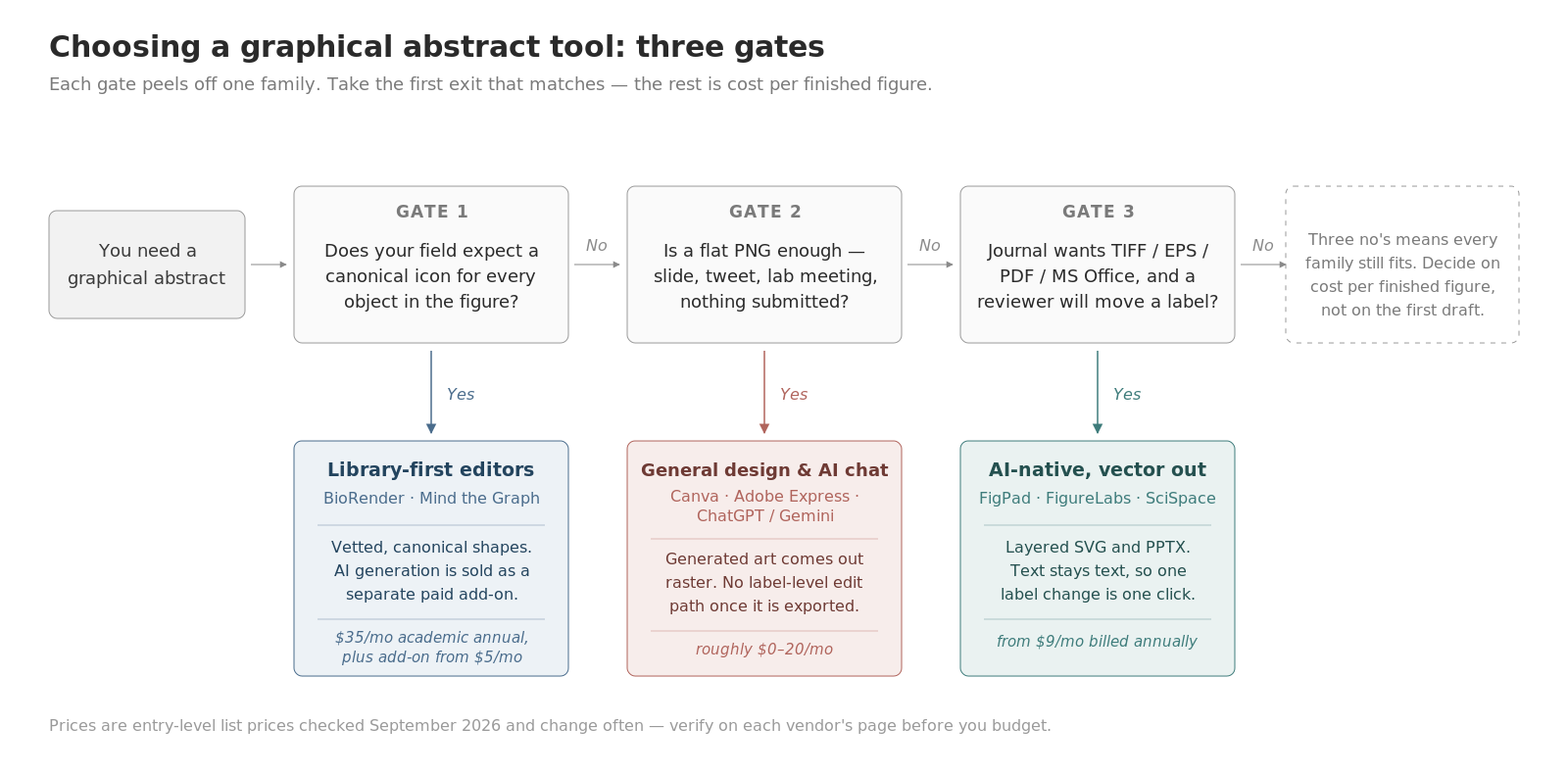
Lumping these into one ranked list hides the real distinction. They fall into three families, and the family predicts the export behaviour better than the brand does.
Library-first editors: BioRender, Mind the Graph
You assemble a figure from a curated, scientifically vetted icon library. AI is bolted on rather than foundational. BioRender's icon set and visual standardisation are genuinely the best in life sciences — this is not a category where a challenger should pretend otherwise. Notably, as of September 2026 BioRender sells AI-assisted figure generation as a separate paid add-on (listed from $5/month on academic annual pricing, $25/month on industry pricing) rather than including it in the base plan, and its paid plans advertise "export editable images to PPT." Mind the Graph, now part of Editage, follows the same library-first shape with a freemium tier; its pricing page renders client-side and we could not capture exact plan figures at check time, so verify before you budget.
AI-native figure tools: FigPad, FigureLabs, SciSpace
Here generation is the product. You give a prompt, a sketch, a reference image, or a whole manuscript, and get a composed figure back. The differentiator inside this group is entirely what happens next. FigPad and FigureLabs both offer vector output on paid tiers. SciSpace's own graphical abstract tool page advertises SVG, PNG and PDF download at 300 dpi and follow-up prompt refinement. FigureLabs is credit-metered; its pricing page (checked September 2026) advertises a free trial of 300 credits with no credit card, with generation, redraw and vector export each drawing down the balance.
General design and general image models: Canva, Adobe Express, ChatGPT / Gemini
Canva Pro will hand you SVG and PPTX downloads — but that applies to designs you assembled from Canva elements. Images produced by Magic Studio's generative tools come out raster, so an AI-generated abstract in Canva is a flat picture inside an editable canvas. Adobe Express with Firefly behaves the same way: excellent layout tooling, raster generative output. Chat-based image models (ChatGPT, Gemini, and peers) return a PNG with no layers at all, plus text rendering that still misspells domain vocabulary often enough that every label needs proofreading.
Comparison table (as of September 2026)
Prices and plan structures below were checked against vendor pages in September 2026. Prices may change; we re-check monthly.
| Tool | What the AI gives you | Best export you can get | Entry price (as of Sep 2026) |
|---|---|---|---|
| BioRender | AI generation sold as a paid add-on | Editable-to-PowerPoint export on paid plans | Free tier $0 (no publication); Academic Individual $35/mo annual, $39 monthly; AI add-on from $5/mo academic |
| Mind the Graph | Library-first, AI assistance | Paid tiers remove watermarks and raise resolution; confirm formats on their page | Freemium; plan figures not readable from the public page at check time |
| FigPad | Native generation from prompt, sketch or reference image | Layered SVG (Plus and Pro) and PPTX where objects stay editable in the slide | $9–31/month billed annually ($19–39 month-to-month) |
| FigureLabs | Native generation | Vector export on paid usage, credit-metered | Credit-based; free trial of 300 credits, no card |
| SciSpace | Paper-to-figure generation with prompt refinement | Vendor lists SVG, PNG and PDF at 300 dpi | Premium listed around $20/month, lower on annual billing |
| Canva | Magic Studio generative images (raster) | SVG and PPTX download on Pro; generated imagery stays raster | Pro around $18/month month-to-month |
| Adobe Express | Firefly generative images (raster) | PDF, PNG, JPG | Premium around $9.99/month |
| ChatGPT / Gemini | Native image generation | PNG, single flat layer | $0 to roughly $20/month |
One column that does not fit the table but decides real cases: publication rights. BioRender is explicit that figures made on its free plan cannot be used for publication or commercial purposes — you need a paid plan for that. FigPad includes publishing rights on every paid tier, with no separate "publication" upsell and no per-figure fee. For the general-purpose tools, rights depend on the vendor's terms and on your journal's AI policy, which is a second gate entirely.
The revision test: run it before you commit
Before you standardise your lab on anything above, spend twenty minutes on this:
- Generate one graphical abstract for a paper you have already published.
- Export it in the best format the tool offers.
- Open that export in Illustrator, Inkscape, or PowerPoint.
- Try to change exactly one label, recolour one arrow, and move one panel.
- Re-export at Elsevier's 1328 × 531 minimum and again as a 1200 × 1200 square for Cell.
Step 4 separates the field faster than any feature matrix. If the label is a text object you can click, you have a workflow. If it is baked into pixels, you have a picture — and you will be redrawing it under deadline. Step 5 catches the tools that can only emit one aspect ratio.
How FigPad fits
FigPad was built around step 4 specifically. The loop is prompt, sketch or reference image in; a composed scientific figure out; then editable SVG and PPTX out of that. Layered SVG here means what it should mean — text is still text, arrows are still arrows, not a welded mass of outlined paths — and the PPTX lands in a slide as editable objects, which matters because Elsevier names MS Office files as a preferred graphical abstract format and because your lab meeting is on Thursday regardless.
The economics are shaped for revision rather than first drafts. Per FigPad's public pricing FAQ (checked August 2026): one generation costs 2 credits, a text correction costs 2 credits, editing elements on the canvas is free, and exporting an editable SVG costs 4 credits — with repeat exports of the same version free. A typical generate-revise-export cycle lands around 16 credits. Layered SVG export sits on the Plus and Pro tiers; PNG export runs 2K on Starter, 4K on Plus, 8K on Pro. Every paid tier carries publishing rights, and FigPad's terms state that your content is not used to train its models. New accounts get free credits without a credit card.
If you are starting from a finished manuscript, the graphical abstract generator is the direct route; if you are building the full figure set for a paper, start at the AI scientific figure generator. Current plan details always live on the pricing page.
When you should stay with BioRender
Three situations where switching is the wrong call, stated plainly:
Your field runs on standardised icons. If your figures are immunology, cell signalling, or molecular biology schematics where reviewers expect the canonical representation of a T cell or a GPCR, BioRender's library is the strongest asset in this comparison. An AI-generated organelle that looks approximately right is worse than a library icon that is exactly right.
Your lab already has a shared BioRender account. Shared folders, co-editing, and a consistent house style across a dozen people are worth more than a lower per-seat price. Migration costs are real.
You are reusing figures across many papers. A library-based editor gives you a component set that accumulates value. A generation-based tool gives you artifacts. For a PI shipping eight papers a year from the same model system, the library wins.
The case for switching is narrower and more honest than "our AI is better": it is cost per finished figure, and how many minutes a reviewer's one-word label change costs you.
Key Takeaways
- Rank these tools by export, not by first-draft beauty. Elsevier prefers TIFF, EPS, PDF or MS Office files; Cell Press wants a 1200 × 1200 px square. A flat PNG satisfies none of them comfortably.
- Regeneration is not editing. If a one-word label change requires a new generation, you do not have a revision workflow.
- BioRender sells AI generation as a separate add-on as of September 2026 — budget for the plan plus the add-on, and remember free-plan figures cannot be published.
- Only part of this field emits true vector. FigPad, FigureLabs and SciSpace advertise vector output; Canva and Adobe Express generate raster imagery even when the surrounding canvas is editable; chat image models emit flat PNG only.
- Check your journal's AI disclosure policy before submitting. Elsevier requires graphical abstracts to comply with its generative AI policies, and a generated illustration must never stand in for primary data.
