

Most BioRender vs Adobe Illustrator comparisons stop at "one is fast, one is powerful." That framing survives until you reach final submission. As of September 2026, BioRender's own help documentation states there is no vector export option for illustrations — all users get PNG and JPEG, premium subscribers add PDF, at 72/150/300/600 DPI. Meanwhile Nature's final-submission guide asks authors to "supply editable, unflattened vector artwork" and not to rasterize line art or text. Illustrator produces exactly that format and is priced at US$22.99/month on an annual commitment. So the two tools are not competitors so much as two halves of a workflow that does not connect cleanly. This guide covers what each actually does, what the handoff costs you, and when a third path makes more sense.
The comparison everyone makes, and the one that matters
The standard pitch is accurate as far as it goes. BioRender gives you a library of scientifically vetted icons — membranes, organelles, model organisms, lab equipment — that a PhD student can assemble into a clean pathway diagram in an afternoon. Illustrator gives you a professional vector editor with anchor-point-level control, artboards, precise stroke weights, and every export format a journal has ever asked for. BioRender optimizes for time-to-first-draft. Illustrator optimizes for control over the finished file.
That comparison is fine for choosing what to start in. It tells you nothing about the two moments that actually hurt:
- Final submission, when the journal's artwork checker wants vector line art and editable text.
- Revision, when Reviewer 2 asks you to relabel one panel eleven weeks after you last opened the file.
Both of those moments are about file format, not about drawing tools. And on file format, the two tools are much further apart than the feature lists suggest.
What BioRender actually exports in 2026
This is the fact that reorganizes the whole comparison, so it is worth stating precisely.
BioRender's help center article on export formats, last updated 30 August 2026, lists PNG (with transparency) and JPEG for all users, with PDF added for premium subscribers. Resolution options are 72 DPI (web), 150 DPI (presentations), 300 DPI (print), and 600 DPI (premium only). The article carries an explicit note: there is no vector export option at this time. SVG export exists for BioRender Graphing files — the data-plotting add-on — but not for illustrations.
That has three practical consequences.
You cannot hand a co-author a working file. Unless they have a BioRender account and you share the project, what they receive is a picture. Every edit routes back through you.
PDF is a partial escape hatch, not a vector export. A premium PDF from a vector canvas usually does carry paths, and you can open it in Illustrator and pull it apart. But you inherit whatever grouping, layer naming and text handling the exporter produced, text is sometimes converted to outlines on the way out, and nothing about the structure is designed for downstream editing. Treat it as recoverable rather than editable, and budget an hour of cleanup per figure to find out which one you got.
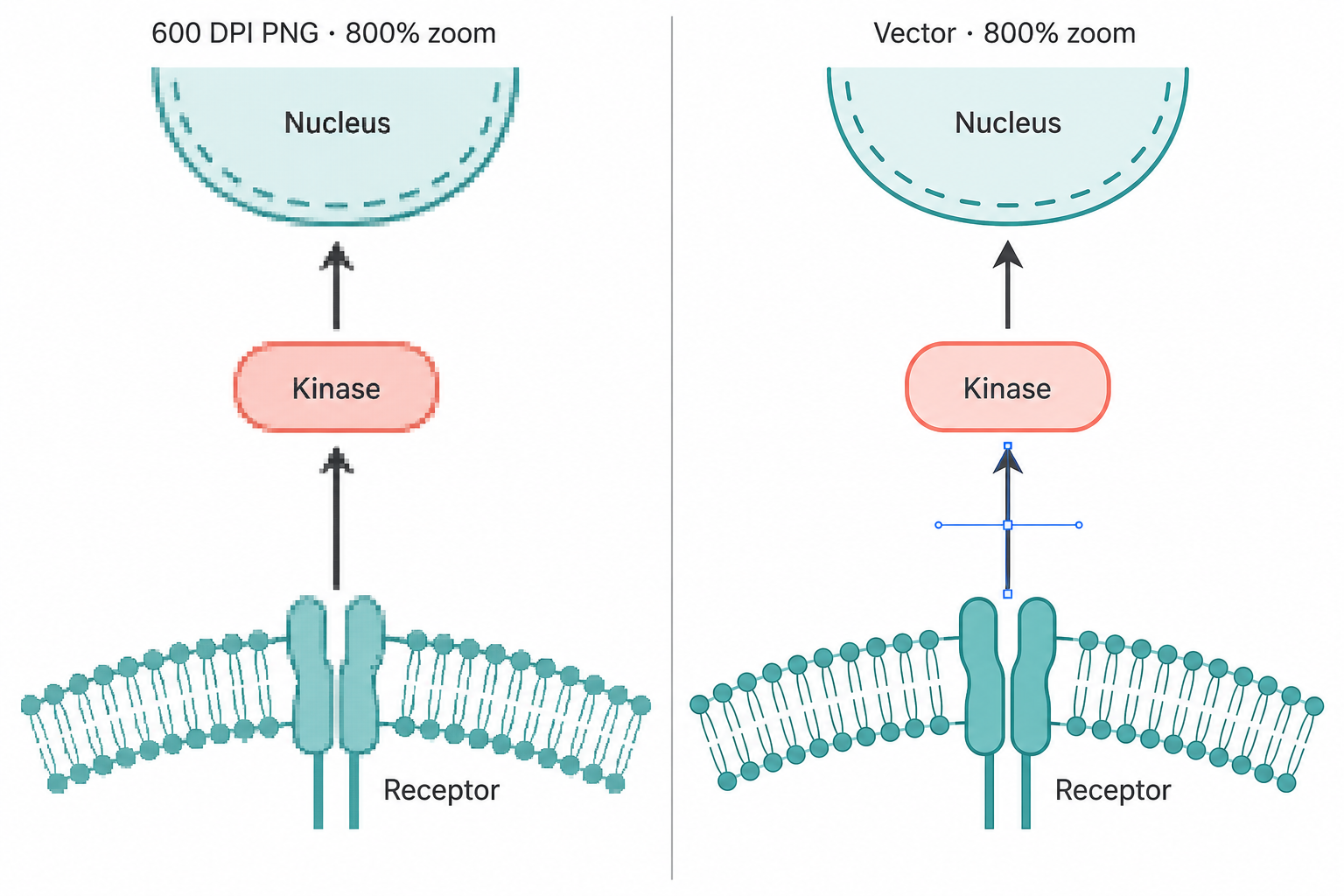
The 600 DPI ceiling is a raster ceiling. For photographic content, 300–600 DPI is exactly what Nature asks for. For line art and text — which is what a pathway diagram is — the journal's instruction is not "make it higher resolution," it is "don't rasterize it at all." A 600 DPI PNG of a schematic is a high-quality photograph of vector artwork, and typography rendered at 5–7 pt in print is where that distinction becomes visible.
What Illustrator gives you, and what it costs in hours
Illustrator's output side is essentially unimpeachable. AI, EPS, PDF, SVG, and layered exports are all first-class, and Nature names Adobe Illustrator (AI), Postscript, vector EPS and PDF as its preferred formats for figures containing line drawings and graphs. Every journal artwork specification you will encounter — line weights between 0.25 and 1 pt at final size, Helvetica or Arial lettering, 8 pt bold panel labels with other text between 5 and 7 pt, 89 mm single-column and 183 mm double-column widths — maps directly onto Illustrator controls. You can set them numerically and verify them.
The cost is not the subscription. It is the input side. Illustrator ships with no biology. There is no mitochondrion, no T cell, no Western blot apparatus. You draw them, buy them, or source them from a free icon repository and hope the style is consistent. For a researcher who is not already fluent in Bézier curves, a complex mechanism diagram is a multi-day project — and a multi-day project you will have to repeat, partially, at every revision.
There is a second, quieter cost: Illustrator is a single-user desktop application in a workflow that is not single-user. Your co-author on the other continent does not have it. Your PI wants the figure in a slide by Thursday. Handing off an .ai file assumes the recipient has a $22.99/month subscription and knows what to do with layers.
Price, as of September 2026
Checked 1 September 2026 against each vendor's public pricing page. Prices may change; we re-check monthly.
| BioRender (Academic Individual) | Adobe Illustrator (single app) | FigPad (Plus) | |
|---|---|---|---|
| Headline price | $35/mo billed annually; $39 month-to-month | $22.99/mo, annual commitment billed monthly | $15/mo billed annually; $25 month-to-month |
| Annual cost | $420/yr | ~$276/yr | $180/yr |
| Free tier | Up to 3 figures, 1 graphing file — no publication or commercial use | 7-day trial only | Free credits on signup, no card required |
| Vector export | None for illustrations (PNG/JPEG all plans; PDF premium) | AI, EPS, SVG, PDF — all native | Layered SVG (Plus/Pro) |
| Editable PPTX | Slide decks inside BioRender | Manual placement | Yes — objects stay editable in the slide |
| Max raster | 600 DPI (premium) | Unlimited on export | 4K PNG on Plus (2K Starter, 8K Pro) |
| Science-specific asset library | Extensive, expert-drawn, its core strength | None | Generated per figure |
| Publication rights | Paid plans only | Included | All paid tiers |
| Team pricing | Lab: $99/mo for 5 seats annually ($129 monthly), +$20/extra seat | Per-seat business plans priced separately | Per-seat |
Two notes on reading this table honestly. First, BioRender's Industry Individual tier is $95/month billed annually ($115 month-to-month) — if you are at a for-profit company, the academic number above does not apply to you. Second, Adobe's student and teacher offer on Creative Cloud Pro ($19.99/month for the first year, $39.99 after) is often the better buy for a grad student who needs Photoshop and Acrobat too; check it before buying the single app.
The combined "draft in BioRender, polish in Illustrator" stack that many labs actually run costs roughly $696/year per person at academic rates — and, as established above, the handoff between those two purchases is the weakest link in the chain.
The handoff problem, stated plainly
Here is the workflow most senior researchers will recommend to you: build the schematic fast in BioRender, export, open it in Illustrator, fix the typography and line weights to journal spec, submit vector.
In 2026, that workflow has a documented gap in the middle. BioRender does not export vector for illustrations. Your bridge is a premium PDF whose internal structure you do not control, or a 600 DPI PNG that you cannot meaningfully edit. Everything downstream — the label the reviewer wants renamed, the panel letter that needs to move, the stroke weight that came back too thin at 89 mm — either happens back inside BioRender (and gets re-exported, and re-polished) or happens in Illustrator on whatever the PDF import happened to give you.
That is not a criticism of BioRender's drawing tools, which are excellent, or of Illustrator's, which are the industry reference. It is a criticism of the seam. And the seam is where your revision week goes.
How FigPad fits
FigPad exists to remove that seam rather than to out-draw either tool. You describe the figure in a prompt, or upload a hand sketch or a reference image, and you get back a figure you can keep editing — as layered SVG where text stays text and arrows stay arrows, as PPTX where the shapes land in the slide as real PowerPoint objects, and as PNG up to 8K. The AI scientific figure generator handles the first draft; the scientific figure creator canvas handles everything after.
The economics are deliberately shaped around revision rather than creation. One generation costs 2 credits, a text correction costs 2, and editing elements directly on the canvas is free — so the loop that ruins your week in a BioRender-to-Illustrator stack is the cheapest thing you can do here. Exporting an editable SVG costs 4 credits, and re-exporting the same version costs nothing. A typical generate-refine-export cycle runs about 16 credits. Plus includes 300 credits per billing cycle on monthly billing (220/month on annual), which is roughly 150 and 110 generations respectively. Layered SVG is on Plus and Pro; Starter is PNG and PPTX only. Full details are on the pricing page, and if you are coming from BioRender specifically, the BioRender alternative page maps the feature differences directly.
Every paid tier includes publication rights with no separate "publication" upgrade and no per-figure fee — FigPad's terms state "you own the outputs generated for you," and separately that "We do not use Your Content to train our own models." Every new account gets free credits without a card.
One honest limitation, since this article is about limitations: an AI-generated figure is a drawing, not data. FigPad's own FAQ says it plainly — some journals ask authors to disclose AI-assisted figure creation, so check your target journal's policy, and never present a generated image as raw experimental data.
When you should stay with BioRender — or with Illustrator
Both of these are real answers, and pretending otherwise would be insulting.
Stay with BioRender if your figures live or die on library accuracy. Its icon set is drawn by scientific illustrators and reviewed by scientists, and for canonical cell biology, immunology and molecular mechanisms, that vetting is genuinely hard to replicate. If your lab has standardized on BioRender's visual language across a decade of papers, grants and posters, consistency across that corpus is worth more than export flexibility. BioRender says it is used by over four million scientists; that network effect is why co-authors can open your file. If your output is mostly presentations and grant figures rather than typeset print artwork, the raster ceiling may never bother you.
Stay with Illustrator if you already know it, or if your figures aren't biology. Nothing here gives you the control Illustrator gives you. If you need spot colors, exact CMYK separations, complex clipping, or a multi-artboard file that feeds a whole paper's worth of panels, Illustrator is the tool. If your figures are apparatus schematics, materials structures, optical layouts or engineering diagrams, no icon library was going to help you anyway — you were always going to draw it. And if you have already spent two years becoming fast in Illustrator, that fluency is a real asset that a new tool has to beat, not just match.
Use all three deliberately if the budget allows. Generate the first draft where it is cheapest, keep the working file in a format that survives, and open Illustrator only for the final typographic pass on the accepted version. The point of this article is that the middle step — a format that survives — is the one most workflows are missing.
Key Takeaways
- BioRender does not export vector for illustrations. Per its help center as of 30 August 2026: PNG and JPEG for everyone, PDF for premium, 600 DPI ceiling, no vector option. Plan your submission format around that, not around a hoped-for SVG.
- Nature asks for the opposite. Its final-submission guide names AI, Postscript, vector EPS and PDF as preferred for line art, and tells authors not to rasterize line art or text and to supply editable, unflattened vector artwork.
- The popular "BioRender then Illustrator" stack costs about $696/year at academic rates ($35/mo + $22.99/mo, as of September 2026) and its weakest point is the file that passes between them.
- Illustrator's cost is hours, not dollars. At $22.99/month it is the cheaper of the two subscriptions; it ships with zero biology, so the expense shows up as your time.
- Sort tools by what survives export, not by what the editor looks like. Flat raster, PDF, layered SVG and editable PPTX are four genuinely different outcomes, and only two of them make a reviewer's label change a five-minute job.
