

A credit is not a unit of anything. It is whatever the vendor decides it is, which is why "300 credits per month" on a pricing page tells you nothing until you price the thing you actually need: one finished figure that survives a round of reviewer comments and leaves the tool as editable SVG or PPTX. Priced that way — four generations to get the composition right, two label corrections after your PI reads it, one high-resolution export, one vector export — the same workflow costs 16 credits on FigPad, around 30 on SciDraw, 40 AI credits on BioRender, and 490 on FigureLabs. Those numbers are incomparable until you convert them to dollars, which is what this article does. Every rate below was read from a vendor pricing page or help centre in August 2026. Prices may change; we re-check monthly.
Why the credit balance on the pricing page is not the price
Credit systems exist because per-generation inference costs money and vendors want to meter it. Fine. The problem is that "credit" has no shared definition, so the number in the plan comparison is unfalsifiable marketing. One tool's 1,000 credits buys two finished figures. Another tool's 220 credits buys thirteen.
Worse, the credit rate card — how many credits each action costs — is usually one click further down, in a FAQ accordion, and it is where the economics actually live. Two tools can advertise identical monthly credit balances and differ by 10× in output, because one charges 2 credits for a text correction and the other charges 60.
The single most consequential line item is almost always the vector export. Generation is the part vendors demo, so generation gets priced attractively. Export is the part you cannot skip if you are submitting to a journal or handing the file to a co-author, so export is where the margin hides. Check that line before anything else.
The unit that actually matters: one finished figure
A finished figure is never one prompt. Anyone who has shipped a paper knows the real shape of it, so here is a standardised basket that reflects the workflow rather than the demo:
- 4 generations — one initial prompt, three iterations before the composition is right
- 2 text corrections — your PI reads it and two labels are wrong
- 1 high-resolution raster export — for the submission portal
- 1 editable vector export — SVG or PPTX, so a co-author can change a label without you
That is deliberately modest. If your figure goes through two rounds of review, double it. If you have six figures in the paper, multiply by six. The basket is the same for every tool, which is the only way to compare them.
Per-action rates, as of August 2026
Read from each vendor's own published rate card. FigPad, BioRender and FigureLabs publish per-action credit costs; SciDraw publishes a credits-per-image figure but no separate rate for edits or vector conversion, so we treat each revision there as a fresh image and mark it as an estimate.
| Action | FigPad | FigureLabs | BioRender AI | SciDraw |
|---|---|---|---|---|
| One generation | 2 | 50 | 20 (returns 3 options) | ~5 |
| Text / label correction | 2 | 60 | 10 (prompt-based modify) | ~5 (regenerate) |
| Edit an element on canvas | Free | In-app vector canvas | Free (manual editing) | Not published |
| Upscale to 4K | Included in tier | 20 | n/a | Not published |
| Editable vector export | 4 (repeat export of the same version is free) | 150 | 0 — included in subscription | 0 — SVG conversion included on paid tiers |
| Basket total | 16 | 490 | 40 AI credits | ~30 (estimated) |
Sources: FigPad pricing page FAQ (checked 27 August 2026); FigureLabs pricing page (checked 25 August 2026 — the page is client-rendered and could not be re-read on 28 August); BioRender help centre articles on AI credits and editable figure generation (both updated within the last two weeks, read 28 August 2026); SciDraw pricing page (read 28 August 2026). Prices may change; we re-check monthly.
Two things in that table deserve to be said out loud. FigureLabs charging 150 credits for the export means the export is more expensive than the entire generation phase — three times the cost of the first draft. And BioRender charging zero for export is genuinely the right design: its AI credits meter AI drafting only, and everything you build by hand with the icon library is unlimited on any paid plan.
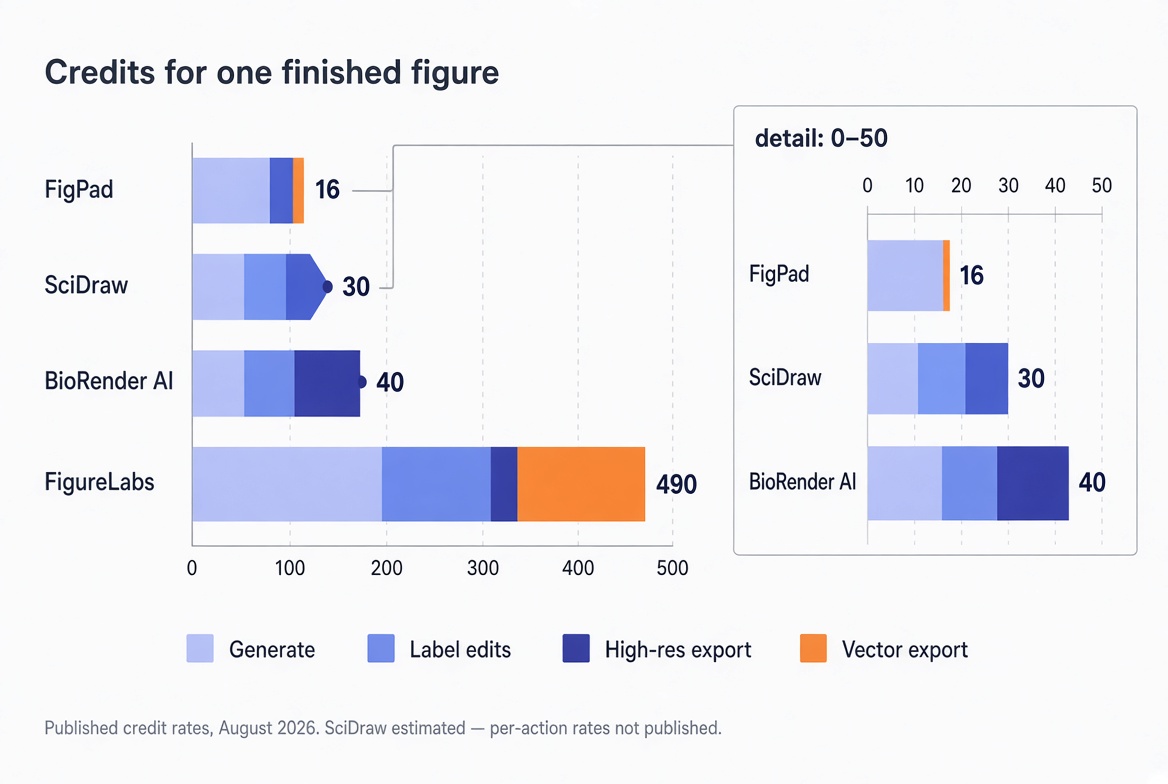
The cost of one finished figure, as of August 2026
Converting credits to dollars is the only comparison that survives contact with a lab budget. Divide the monthly credit balance by the basket, then divide the plan price by the number of figures that yields.
| Plan (as of August 2026) | List price | Credits included | Credits per finished figure | Finished figures per month | ≈ Cost per finished figure |
|---|---|---|---|---|---|
| FigPad Plus, annual | $15/mo ($180/yr) | 220/mo | 16 | ~13 | ~$1.09 |
| FigPad Plus, month-to-month | $25/mo | 300/mo | 16 | ~18 | ~$1.33 |
| FigPad pay-as-you-go | $12 one-time | 95, no expiry | 16 | ~5 total | ~$2.02 |
| SciDraw Standard | $20/mo list ($10 promo at time of writing) | 300/mo | ~30 (est.) | ~10 | ~$2.00 |
| FigureLabs Plus, month-to-month | $35/mo | 5,000/mo | 490 | ~10 | ~$3.43 |
| FigureLabs Starter | $10/mo | 1,000/mo | 490 | ~2 | ~$4.90 |
| BioRender Academic Individual + $10 AI add-on | $35/mo annual + $10/mo | 100 AI credits/mo | 40 | ~2 AI-drafted figures | ~$18.00 per AI figure |
Prices may change; we re-check monthly.
The BioRender row needs its caveat stated properly rather than buried, because taken alone it is misleading. BioRender's subscription buys unlimited manually assembled figures from one of the best scientific icon libraries in existence, plus unlimited exports with publication rights. The AI credits are a separate metered add-on for AI drafting only. If you build figures the BioRender way — dragging validated icons onto a canvas — your marginal cost per figure is zero and this table does not describe you. The $18 number describes the specific case of someone who wants AI to write the first draft, which is an add-on BioRender prices at $5–$20/month for academics, up to an unlimited tier with a 2,500-credit monthly fair-use cap.
Three pricing traps that only appear during revision
The export gate. Some tools put vector export behind both a credit charge and a plan tier. FigureLabs excludes vector and PPTX entirely from its free tier, so you cannot evaluate the part of the workflow that determines whether the figure survives submission. FigPad puts layered SVG on Plus and Pro but not Starter — worth knowing before you buy the cheapest tier and discover it exports raster only. Whatever you are considering, generate one test figure and try to export it as vector before you commit a month.
Credits that expire. BioRender's add-on credits expire at the end of each billing period. FigureLabs credits reset each cycle on individual plans. FigPad's subscription credits also reset per cycle, though its one-time pay-as-you-go packs do not expire. This matters more than it sounds, because figure work is bursty: you touch the tool twice in three months, then need eleven figures in one weekend before a deadline. A monthly reset punishes exactly that pattern, and a non-expiring pack is the honest fit for it.
The first-year annual price. Several tools in this category advertise a heavily discounted annual rate that applies to the first year only, with renewal at a much higher steady-state price. FigureLabs' promotional annual pricing has worked this way. Read the renewal line, not the headline, and put the renewal date in your calendar the day you subscribe.
How FigPad fits
FigPad's credit design is a direct answer to the basket above: 2 credits to generate, 2 credits for a text correction, free for editing any element on the canvas, and 4 credits to export layered SVG — with repeat exports of the same version costing nothing. There is no large one-off export fee, which is what makes the 16-credit round-trip possible.
That number only matters because of what the export contains. A layered SVG from the AI scientific figure generator keeps text as text and arrows as arrows rather than fusing everything into one welded outline, which is the difference between fixing a reviewer's label in thirty seconds and regenerating the figure from scratch. PPTX export drops the graphic into a slide as editable objects for the lab meeting version. Every paid tier includes publication rights, with no per-figure fee and no separate "publishing" tier, and FigPad's terms state that your content is not used to train its models.
Current rates, tiers and what each includes are on the pricing page. If you are specifically weighing this against an incumbent, the BioRender alternative and FigureLabs alternative pages lay out the feature-level differences rather than just the arithmetic. New accounts get free credits with no card required, which is enough to run the basket yourself and check our numbers.
When you should stay with BioRender — or FigureLabs, or SciDraw
Stay with BioRender if your figures are canonical biology and the icon library is the product you are actually buying. Nothing in the AI generation category matches BioRender's validated, standardised icon set or the recognisability of its house style to reviewers in cell and molecular biology. Its unlimited-figure model also beats any credit system outright once you are producing figures constantly — at high volume, metered pricing loses to a flat rate, and a lab with institutional access should not switch on cost arithmetic alone.
Stay with FigureLabs if you value model choice and you work in long, exploratory sessions. Its multi-model lineup and daily refresh credits reward someone generating steadily every day, and its higher tiers bring the effective per-figure cost down considerably. Its expensive export makes sense for a workflow where you generate many candidates and export very few.
Stay with SciDraw if a flat per-image rate with SVG conversion bundled into the subscription matches how you think, and you want the simplest possible mental model: one image, five credits, done.
Switch on the strength of the per-figure arithmetic only if your pattern is the one most people in a lab actually have — a handful of figures per paper, each surviving several rounds of edits, all needing to leave the tool in an editable format.
Key Takeaways
- Compare rate cards, not credit balances. A monthly credit total is meaningless without the per-action cost of generation, text edits and export.
- Price the basket, not the demo. One finished figure means roughly four generations, two label fixes and two exports — around 16 credits on FigPad, ~30 on SciDraw, 40 AI credits on BioRender, 490 on FigureLabs, as of August 2026.
- The vector export line is where the money is. It ranges from free (BioRender, SciDraw paid tiers) to 4 credits (FigPad) to 150 credits (FigureLabs).
- Check expiry and renewal terms. Credits that reset monthly punish deadline-driven bursty use; discounted annual rates are often first-year-only.
- BioRender's unlimited manual figures are a genuinely different model. If you build with icons rather than prompts, per-figure credit maths does not apply to you at all.
