

Most FigureLabs vs BioRender comparisons stop at "AI generator versus icon library." The comparison that decides your next six months is narrower: what file comes out, and can you still edit it after Reviewer 2 asks you to rename a protein. Checked on both vendors' own pages on 26 August 2026, the answer is uncomfortable for both. BioRender's help centre states plainly that there is "no vector export option at this time" — illustrations export as PNG, JPEG, or PDF for premium users, at up to 600 DPI. FigureLabs does export layered SVG and editable PPTX, but charges 150 credits per export, three times the cost of a generation. This article works through both products' verified 2026 pricing, the export matrix nobody publishes, the AI-disclosure problem that applies to both, and how to choose.
The question that actually decides this
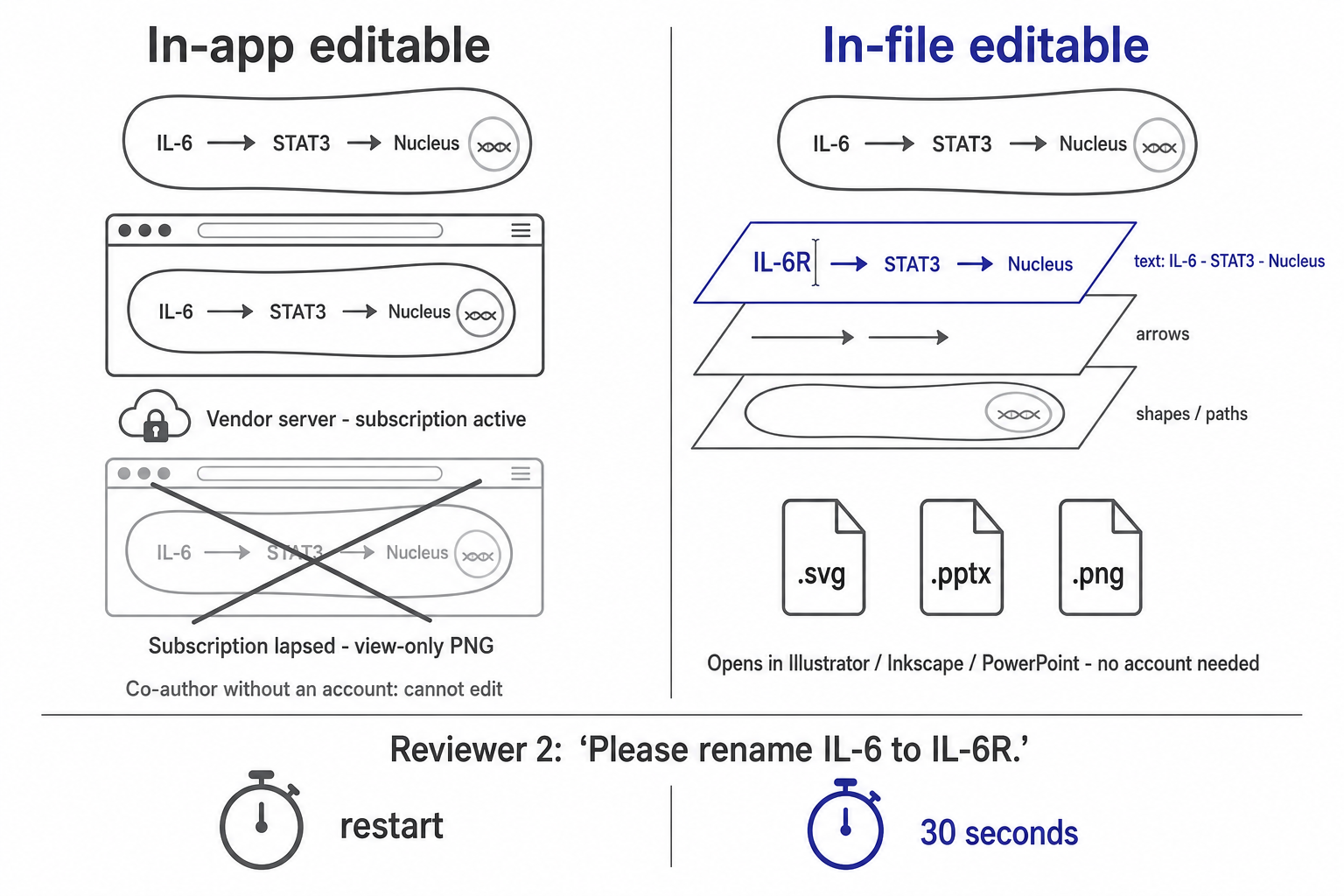
"Which tool makes better figures" is the question everyone asks and the wrong one. Both tools make figures that get published. The variable that separates a calm revision round from a lost weekend is where your figure stays editable: inside the app, or inside the file.
Editable in-app means the figure is a live document on a vendor's servers. Every element is separable, every label is retypeable — as long as you keep logging in and keep paying. That is BioRender's model, and for a lot of labs it is fine.
Editable in-file means the artefact you export is itself structured: labels are text objects, elements are separate paths, and a co-author who has never opened the tool can change a word in Illustrator, Inkscape, or PowerPoint. That is what "layered SVG" and "editable PPTX" are supposed to mean.
These are genuinely different bets. In-app editability is richer while you are inside the ecosystem, and worth zero the moment you are not. In-file editability is coarser but survives subscription lapses, co-authors at other institutions, and the eighteen-month gap between submission and the corrected proof. Neither is universally correct. But almost nobody checks which one they are buying before they buy it.
What BioRender actually is in 2026
BioRender is a manual assembly tool with an AI layer bolted on top, and it is very good at the manual part. You build a figure from a curated library of scientifically vetted icons, laid out on a canvas, using conventions that immunologists and cell biologists recognise on sight. The company says it is trusted by over four million scientists. That standardisation is real and it is the reason the tool is hard to displace: when your reviewer has seen the same membrane bilayer motif in three hundred papers, a figure that uses it reads as competent before anyone parses the content.
Verified on biorender.com/pricing on 26 August 2026, the academic tiers are: Free at $0 (up to 3 figures, 1 Graphing file, some free AI credits, explicitly no commercial use or publication), Individual at $35/month billed annually or $39 monthly, and Lab at $99/month annually or $129 monthly for five seats, with extra seats at +$20/month. Industry pricing is a different animal: Individual is $95/month annually or $115 monthly, and Team is $475/month annually or $570 monthly for five seats. Publication rights, high-res exports, and watermark removal all start at the first paid tier.
Two things on that page are easy to miss. AI figure generation is a paid add-on, not an included feature — listed at $5/month as a starting annual price on academic plans and $25/month on industry plans. So does BioRender Graphing, at $15 per seat per month academic. The headline $35 is a floor, not a total.
And per BioRender's own AI FAQ: the protocol, timeline, and flowchart generators build from BioRender components and stay fully editable, but images made with the Make your own icon tools and the custom figure generator "result in flat PNGs," refinable only through further AI image editing. That is an unusually honest disclosure from a vendor, and it is the single most important sentence on the page for anyone planning to lean on AI generation.
What FigureLabs actually is in 2026
FigureLabs is the inverse: generation-first, assembly-second. You describe a mechanism, upload a sketch, or drop in a reference image, and it composes a plausible first figure without you hunting an icon library. It runs a multi-model strategy — as of August 2026 its pricing page lists eight image models gated by tier — plus a chat-style revision history, region redraw, upscaling, a built-in vector canvas, and image vectorisation. Its own FAQ positions it as a "BioRender companion" rather than a replacement.
Read from figurelabs.ai/pricing on 25 August 2026: Free gives 150 one-time credits plus 50 daily refresh credits, caps output at 1K, excludes vector export entirely, and is non-commercial only. Starter is $10/month with 1,000 credits, 4K exports, and SVG + PPTX. Plus is $35/month with 5,000 credits and 8K. Pro is $99/month with 20,000. Team is $35/seat/month with up to 20% credit rollover.
The per-action credit table is where the real cost sits: a generation, regeneration, or region redraw is 50 credits; a text edit is 60; upscaling to 2K/4K/8K is 10/20/40; and an SVG or PPTX vector export is 150. Price a realistic figure — four generations, two label fixes, one 4K upscale, one export — and you are at roughly 490 credits, or about two finished figures a month on Starter. The structural problem is not the price level; it is that the most expensive action is the one peer review makes you repeat.
Prices for both tools may change; we re-check monthly.
The export matrix is where the decision lives
This is the table that should sit at the top of every comparison and never does. All figures verified against vendor documentation on 26 August 2026 (FigureLabs pricing read 25 August 2026).
BioRender | FigureLabs | |
|---|---|---|
Core method | Manual assembly from vetted icon library | AI generation from prompt / sketch / reference image |
Academic entry price | $35/mo annual, $39 monthly (Individual) | $10/mo (Starter) |
AI generation | Paid add-on, from $5/mo academic (annual) | Included in every tier |
Free tier limits | 3 figures, no publication, no commercial use | 1K output, no vector export, non-commercial |
PNG / JPEG export | All users | All tiers (1K free, up to 8K on Plus+) |
PDF export | Premium only | Not listed |
PPTX export | Select paid plans (per separate help article) | Included from Starter, 150 credits per export |
Vector SVG export | None — "no vector export option at this time" | Yes, from Starter, 150 credits per export |
Max raster resolution | 600 DPI (premium); 72/150/300 otherwise | 8K, which the vendor equates to ~1200 DPI |
AI figure output structure | Custom figure generator returns flat PNGs; flowchart/protocol/timeline stay editable | Raster by default; vectorisation available |
Training on your uploads | No, per vendor | No, per vendor |
Discipline strength | Cell / molecular / immunology conventions | Broader subject range, weaker conventions |
Note the one row that contradicts common belief. Several third-party articles describe BioRender's PDF export as "vector," and a BioRender help article separately documents PPTX export on select paid plans — but BioRender's own export-formats article, updated 25 August 2026, carries an explicit red note: there is no vector export option at this time. If your journal's artwork checker wants EPS or SVG, or your co-author wants to nudge a label in Illustrator, that single line matters more than any feature list.
The AI question neither tool can dodge
Both vendors now put compliance warnings on their own marketing pages, which tells you how live this issue is. BioRender's AI tools page states that most major journals restrict or prohibit fully AI-generated scientific figures, and points at NIH policy for grant applications.
The underlying policy is NIH Notice NOT-OD-25-132, "Supporting Fairness and Originality in NIH Research Applications," issued 17 July 2025 and applied from the 25 September 2025 receipt date onward. It is worth stating precisely, because it gets misquoted in both directions: NIH does not ban AI assistance outright. It says applications, or sections of applications, substantially developed by AI will not be considered the applicant's original ideas — a research-integrity concern rather than a filter. Human authorship of the scientific argument has to be real.
The practical translation for figures: a generated composition you then verify, restructure, relabel, and can explain is a draft you made. A generated image you paste in unexamined is a risk regardless of which vendor produced it. Check your target journal's specific policy — they diverge sharply — and keep your source files, because "can you send the editable version" is a request from editors as often as from co-authors.
How FigPad fits
We build FigPad, so treat this as an argument rather than a finding. FigPad sits deliberately on the editable in-file side of the split above: prompt, sketch, or reference image in, and out comes layered SVG in which labels remain independently editable text objects, plus editable PPTX for the co-authors who will never open a vector editor, plus high-resolution PNG from 2K to 8K depending on plan. A built-in vectorizer turns an existing bitmap — an old slide, a screenshot, a scanned whiteboard sketch — into editable paths. Paid plans include publication rights, and the terms state that outputs belong to you and that uploads are not used to train models.
The design bet is simple: re-exporting after a reviewer comment should not be the expensive operation in your month. If you are weighing this against a current subscription, the BioRender alternative and FigureLabs alternative pages lay it out feature by feature. If you have a deadline this week, the AI Scientific Figure Generator is the shortest path from a methods paragraph to a first draft, and the Graphical Abstract Generator handles journal graphical-abstract specs. Current tier details live on the pricing page. According to FigPad, 100K+ researchers use it, at institutions including MIT, Stanford, UC Berkeley, Yale, Cornell and Cambridge.
One honest limit, since this article is about reading the fine print: FigPad's PDF-to-poster feature accepts files up to 80 MB and parses only the first 30 pages. That covers a manuscript. It does not cover a thesis.
When you should stay with BioRender
Four situations where switching is the wrong call, and none of them are close.
Your field runs on its conventions. For cell, molecular, and immunology figures, BioRender's icon library is the best in the field and nothing has matched its standardisation. If your reviewers expect that visual grammar, delivering it is not a compromise — it is the job.
Your institution already pays. Many universities hold site licences. A tool that costs your lab nothing beats a cheaper tool that costs something, unless the format gap is actively blocking you.
You need accuracy you can defend. Every icon is vetted. An AI generator, ours included, can produce a confident and wrong number of transmembrane domains. If you are not going to inspect the output element by element, a curated library is the safer default.
You work in industry. Publication and commercial rights are cleanly defined and enterprise-grade compliance documentation exists. That is worth real money in a regulated setting.
When you should stay with FigureLabs
You are already on Pro or Team. At 20,000 credits a month, a 150-credit export stops being a constraint worth restructuring your workflow around.
Model choice is your workflow. Running one prompt across eight models at the same credit cost and picking the winner is a genuine feature that single-model tools do not replicate.
You log in most days. The 100 daily refresh credits on paid plans meaningfully improve the effective cost per figure for continuous users — and do nothing for someone who touches the tool twice a year during revision crunch.
You are mid-revision. Do not migrate a manuscript to save $20. Finish the paper, then switch.
Key Takeaways
-
BioRender has no vector export. Its own help centre, updated 25 August 2026, says so explicitly. Illustrations come out as PNG, JPEG, or PDF for premium users, up to 600 DPI.
-
BioRender's AI custom figure generator returns flat PNGs, per BioRender's own FAQ — while its flowchart, protocol, and timeline generators stay editable. Those are different products under one label.
-
FigureLabs prices the export, not the generation. At 150 credits per SVG or PPTX export against 50 per generation, the revision loop is the expensive part of the workflow.
-
Compare on cost per finished figure, not price per month. BioRender's $35 academic tier excludes AI generation (a $5+/month add-on); FigureLabs' $10 Starter covers roughly two finished figures a month.
-
Ask "editable where?" before you subscribe. In-app editability ends with your subscription. In-file editability travels with the manuscript. Test it: generate one real figure, export it, open it in Inkscape, and try to rename one label.
