

BioRender's Student plan costs $180 per year, $19.95 month-to-month, or $68 per four-month term as of September 2026. The Undergraduate plan is cheaper — $20 for four months — but BioRender's own help centre states plainly that it carries no publication rights, which makes it the wrong tool for anyone with a manuscript in review. The free Basic tier exports PNG and JPG at 72 DPI with a watermark and caps you at 50 objects per canvas, so it fails most journal artwork checks before licensing even enters the conversation. Cheaper alternatives exist, and several are genuinely good. But the number on a pricing page is rarely the number that matters to someone on a stipend. What matters is cost per finished, revised figure — the one that survives a reviewer asking you to relabel panel C. This guide compares the 2026 options on that basis, including where the cheap tiers quietly drop vector export.
The cheapest plan that can't publish is not cheap
The single most expensive mistake a student makes with figure software is paying for eight months of a plan that cannot license the output.
BioRender's Undergraduate Subscription is $20.00 USD per four-month term — about $5 a month, a 70% discount, and the cheapest premium access in the whole academic lineup. It unlocks unlimited figures, 300 and 600 DPI exports, transparent backgrounds, and no watermark. The help centre's feature table also has one red ❌ in it: Permission to publish in journals. If your first-author paper gets accepted in month three, the figures you made are not licensed, and there is no in-app upgrade path — BioRender states that Undergraduate, Student, and Postdoc plans cannot be upgraded in-app at all. You contact support, cancel, resubscribe, and re-export everything.
The free Basic tier has a harder ceiling. Per BioRender's own documentation, it gives you full editor access but limits illustrations, caps canvases at 50 objects, and exports only PNG and JPG at 72 DPI with a watermark. No PDF, no transparent background, no version history, and the built-in AI figure tool is restricted to flat figures. Seventy-two DPI is the detail that ends the conversation: almost every journal artwork checker wants 300 DPI for halftones and 600–1200 for line art. The 14-day free trial doesn't rescue it either — BioRender says the trial includes neither publishing rights, nor watermark removal, nor high-resolution export.
So the real starting line for a student who intends to publish is $180/year, not $0 and not $20.
What BioRender actually charges academics in 2026
Worth laying out, because the tiers are easy to confuse and the eligibility rules bite.
- Basic (free): limited illustrations, 50 objects per canvas, 72 DPI watermarked PNG/JPG, no publication rights.
- Undergraduate: $20.00 USD per 4 months. Four-month billing only. Premium features, no publication rights.
- Student (graduate): $68.00 per 4 months, $19.95 per month, or $180.00 per year. Publishes in journals, academic sites, and grants, plus up to 5 figures in a non-profit textbook.
- Postdoc: publishes in journals, academic sites, and grants; no textbook rights without an upgrade. BioRender no longer lists the price publicly — the help page directs you to the Plan & Billing tab after logging in.
- Academic Individual: $39.00 per month or $420.00 per year. This is the tier you need if your department reimburses you.
That last line is the clause most people miss. BioRender states that Student and Postdoc discounts are for users paying out of pocket with a personal credit card, and that institutional reimbursement disqualifies you. If your PI's grant is covering the tool, your price is not $180/year — it's $420/year, or a Lab license.
(Figures verified against BioRender's help centre as of September 2026. Prices may change; we re-check monthly.)
Five cheaper routes, and the catch in each one
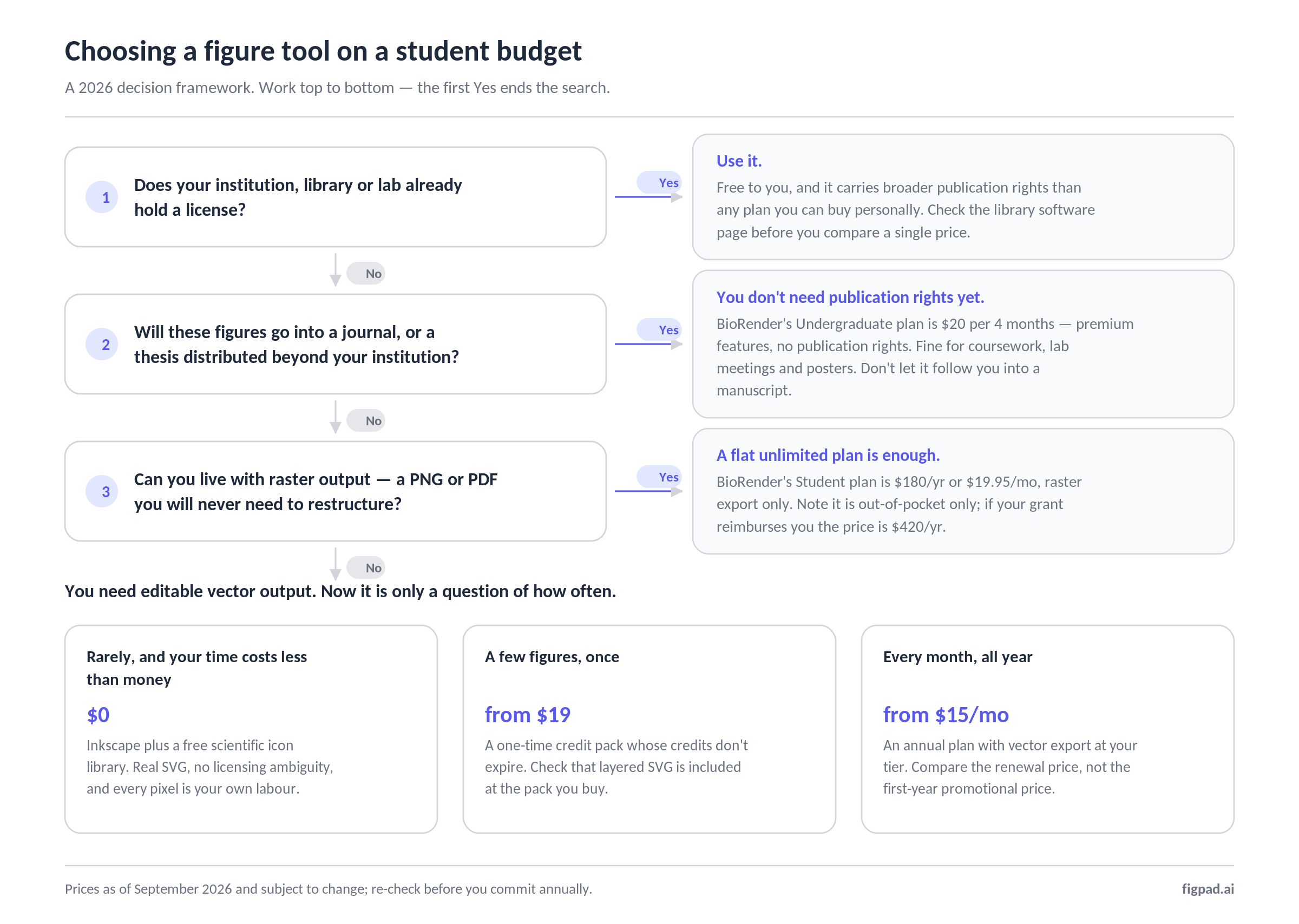
Inkscape plus a free icon library — $0, and it really is $0
Inkscape is free, open source, and produces real SVG. Paired with free scientific icon sets, it can produce a publication-grade figure with no licensing ambiguity whatsoever. The catch is entirely your time: you are drawing and aligning everything by hand, and a five-panel figure is an evening, not a coffee break. For a student with more hours than money it is still the honest best value in the field, and it stays useful as the tool you open to make final tweaks no matter what generated the draft.
Canva — free, but probably not for you
Worth clearing up, because the advice circulates every year: Canva's free Education program is for K–12 teachers and students. University and graduate students do not qualify for it individually; higher-ed institutions go through Canva for Campus. So for a PhD student, Canva is the ordinary free or Pro tier, with no scientific icon library and no vector export on free.
Adobe Illustrator on the student discount — cheap for a year, then not
Adobe's US education offer is $19.99/month for the first year on an annual plan, stepping up to $39.99/month afterwards; prepaid, that's $239.88 for year one and $479.88/year after. Illustrator is the most capable vector editor here by a wide margin. But year two costs more than BioRender's Academic Individual plan, and you still have to draw every cell and receptor yourself.
FigureLabs — $9/month advertised, $10/month at renewal
FigureLabs runs an aggressive first-year promotion. As of September 2026 its Starter tier shows $9/mo billed annually — $108 for the first year, then $120/year — with 1,000 credits per month, 4K export, SVG and PPTX vector export, and publication authorization. Plus shows $16/mo promotional against a $35 list price: $192 the first year, then $420/year. Read the renewal line before you commit; the second-year price is roughly double on Plus. The free tier gives 150 one-time credits plus 50 daily refresh credits but is capped at 1K export, has no vector export, and is explicitly non-commercial.
Its credit costs are published: 50 credits per generation, 60 per text edit, 150 per SVG or PPTX vector export, 10/20/40 to upscale to 2K/4K/8K. A generate → fix a label → export-vector cycle is therefore around 260 credits, so Starter's 1,000 monthly credits is roughly three to four finished figures a month before the daily refresh credits are counted.
Your institution's existing license — check before you pay anything
Many universities hold BioRender institutional or lab licenses, and many students discover this after a year of personal payments. It takes one search of your library's software page and one email. If it exists, it is free to you, carries broader publication rights than any individual plan, and removes the author-position and reimbursement headaches entirely. Do this first.
The 2026 price table
Honest version, entry tier only, US dollars, as of September 2026. Prices may change; we re-check monthly.
| Tool | Cheapest way in | Can publish? | Vector (SVG) out? | The catch |
|---|---|---|---|---|
| BioRender Basic | Free | No | No | 72 DPI, watermark, 50 objects/canvas |
| BioRender Undergrad | $20 / 4 months | No | No | No in-app upgrade; 4-month billing only |
| BioRender Student | $180/yr or $19.95/mo | Yes | No | Out-of-pocket only; not reimbursable |
| BioRender Academic Individual | $420/yr or $39/mo | Yes | No | The real price if your grant pays |
| Inkscape + free icon sets | Free | Yes | Yes | Every pixel is your labour |
| Adobe CC Pro (student) | $19.99/mo yr 1, then $39.99/mo | Yes | Yes | Year-two step-up; draw it all yourself |
| FigureLabs Starter | $108 yr 1, then $120/yr | Yes | Yes | Renewal price; credits reset monthly |
| FigPad (pay-as-you-go) | $12 or $19 once, credits never expire | Yes | SVG on the $19 pack and up | Starter tier is PNG-only |
| FigPad (annual) | $9/mo Starter, $15/mo Plus | Yes | SVG on Plus and Pro | Starter tier is PNG-only |
Sources: BioRender help centre, FigureLabs pricing page, Adobe education pricing terms, FigPad pricing page, all checked September 2026.
The number that actually matters: cost per revised figure
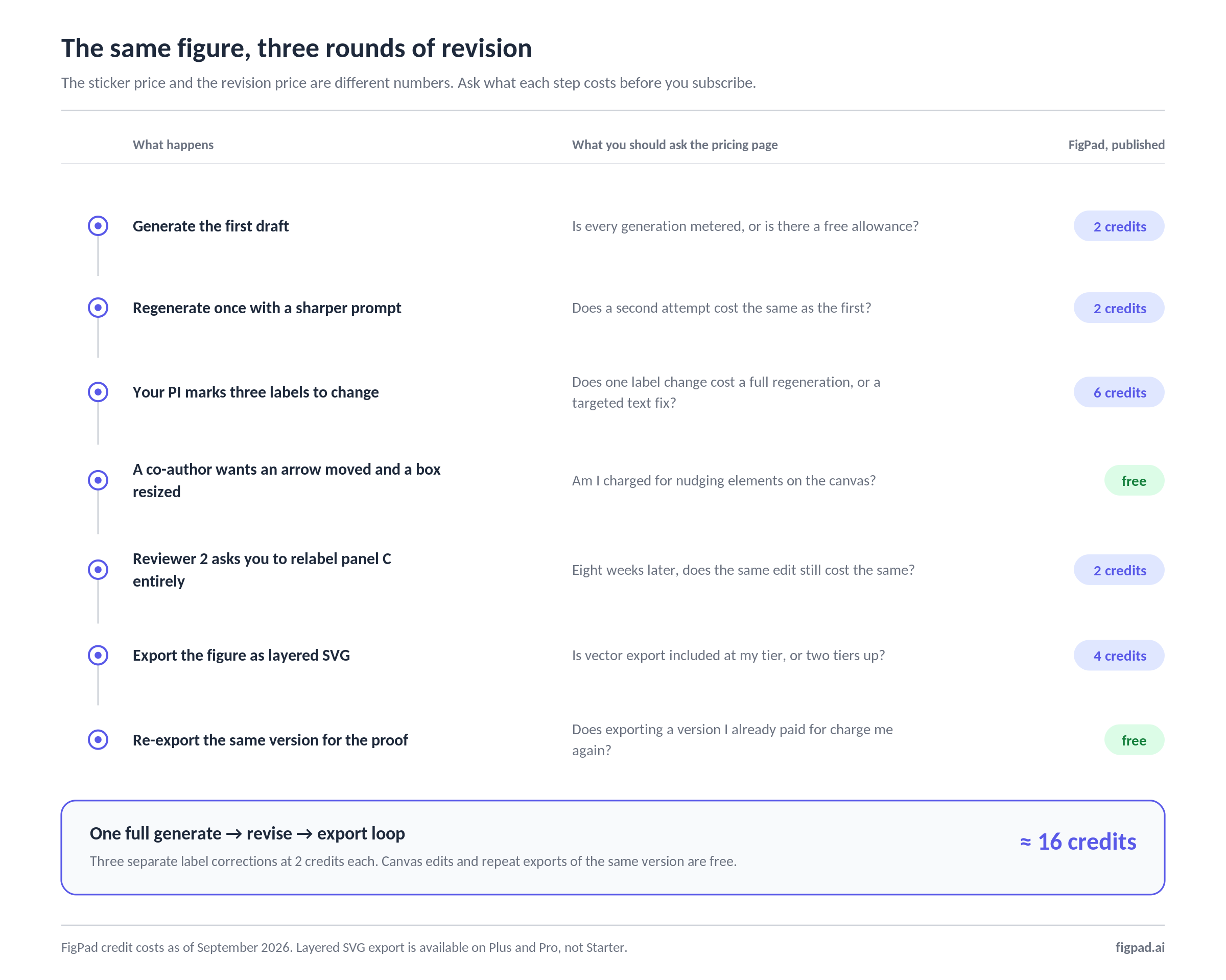
Subscription pricing hides the thing that ruins a student's month. You do not make a figure once. You make it, your PI marks up the labels, you fix them, the co-author wants the arrow moved, and eight weeks later Reviewer 2 wants panel C relabelled entirely.
On a tool with unlimited figures and a flat monthly fee, revisions are free but slow — you redraw by hand. On a credit-metered AI tool, revisions have a price, and whether that price is survivable depends on two things almost nobody checks before subscribing: what a text edit costs, and whether re-exporting the same figure costs again.
This is where the cheap tiers separate. Ask any tool three questions before you pay:
- What does changing one label cost — a full regeneration, or a cheap targeted edit?
- Does exporting the same version twice charge me twice?
- Is vector export included at my tier, or only two tiers up?
Question three catches people constantly. On most of these products, including ours, the entry tier is raster-only.
How FigPad fits
FigPad is built around the revision problem rather than the generation problem. You go from a prompt, sketch, or reference image to a scientific figure, and then — this is the part that matters for a deadline — the figure stays editable as layered SVG and PPTX, where the text is still text and the arrows are still arrows rather than one welded outline.
The pricing is designed so a student doesn't have to subscribe to find out. As of September 2026 there is a one-time pay-as-you-go option at $12 for 95 credits (≈47 generations) or $19 for 160 credits (≈80), and those credits do not expire. Annual plans run $9/mo Starter ($108/yr), $15/mo Plus ($180/yr), and $31/mo Pro ($372/yr); month-to-month is $19 / $25 / $39. Being straight about the tiering: layered SVG export is on Plus and Pro, not Starter — the cheapest route to editable vector is the $19 one-time Plus pack or the $15/mo annual Plus tier.
The credit mechanics are what make the revision math work. One generation is 2 credits. A text correction is 2 credits. Editing elements on the canvas is free. An editable SVG export is 4 credits, and re-exporting the same version costs nothing. A realistic generate → revise → export loop lands around 16 credits — so the $19 one-time pack is roughly ten complete figure cycles, bought once, with no renewal date to diary. Every paid tier includes publication rights, with no separate "publishing" tier and no per-figure fee; FigPad's terms state that you own the outputs generated for you, and that your content is not used to train models.
If you want to see the workflow before spending anything, every new account gets free credits with no credit card required. The scientific figure creator and the graphical abstract generator are the two entry points most students start from; the full tier breakdown lives on the pricing page, and there's a longer side-by-side on the BioRender alternative page.
One honest limit worth stating: the PDF-to-poster feature accepts files up to 80MB and parses only the first 30 pages. For a conference poster from a single paper that is plenty; for a thesis, it isn't.
When you should stay with BioRender
BioRender's icon library and its standardisation are real, and no amount of cheap credits substitutes for them. Stay where you are if:
- Your institution already pays. An institutional or lab license is free to you and has broader rights than any individual plan. Nothing here beats free-and-already-licensed.
- Your field has a visual vocabulary you're expected to match. Immunology, molecular biology, and virology figures drawn from a curated, scientifically reviewed icon set read as correct to reviewers in a way a generated figure has to earn.
- You need your whole lab in one shared workspace. Shared folders, commenting, and a common asset library across a group are mature there and are a genuine reason to standardise.
- You publish in textbooks. The Student and Academic Individual plans cover up to 5 non-profit textbook figures; most AI figure tools don't address textbook licensing at all.
- You're an undergraduate who isn't publishing. $5 a month for unlimited watermark-free figures for coursework and posters is, on its own terms, a good deal. Just don't let it follow you into a manuscript.
The case for switching is narrower: you need vector output you can restructure, you're paying out of pocket, and you'd rather buy credits once than carry a subscription through a year when you might only make six figures.
Key Takeaways
- BioRender's cheapest tier can't publish. The $20/4-month Undergraduate plan has premium features and no publication rights, and there's no in-app upgrade path when your paper is accepted.
- The real BioRender student entry price is $180/year ($19.95/mo, or $68 per 4 months) as of September 2026 — and $420/year if your department reimburses you, because the student discount requires paying out of pocket.
- Check your institution's license first. A lab or institutional seat is free to you and carries broader rights than anything you can buy personally.
- Read the renewal line, not the promo line. Several first-year discounts in this category roughly double at renewal; compare year-two prices before committing annually.
- Compare cost per revised figure, not per month. Ask what a single label change costs, whether re-exporting charges you twice, and whether vector export is included at the tier you can actually afford.
